Best Practices for using NGX Storage for Backup Workloads
1. Overview
This article describes recommended NGX Storage configuration practices when NGX Storage is used as a backup target for backup and recovery applications.
The recommendations cover the following storage access protocols:
-
Block storage: Fibre Channel (FC) and iSCSI
-
File storage: NFS and SMB
-
Object storage: S3-compatible object storage
The objective is to provide reliable connectivity, optimize data-transfer performance, and ensure predictable behavior during backup, restore and retention operations.
2. General Recommendations for All Protocols
2.1 Avoid Redundant Data Reduction
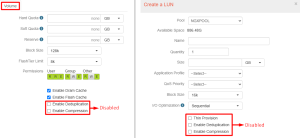
When deduplication or compression is enabled in the backup application, disable the corresponding features on the NGX Storage side where applicable. Applying data-reduction operations at multiple layers can introduce unnecessary processing overhead and affect performance.fdf
3. Block Storage
Block storage presents LUNs directly to the repository server. The operating system manages the filesystem, while NGX Storage handles the underlying block I/O.
3.1 iSCSI Network Configuration
For iSCSI connectivity, follow these recommendations:
-
Use a dedicated Ethernet switch infrastructure or a separate VLAN for iSCSI traffic.
-
Configure jumbo frames consistently across the complete data path, including the server, network switches and NGX Storage interfaces.
-
Verify MTU consistency across all components before enabling jumbo frames in production.
-
Do not use LACP as a substitute for iSCSI multipathing. Use multiple Ethernet links with host-side multipathing instead.
-
Where possible, distribute redundant paths across independent network interfaces and switches.
Each iSCSI interface should have its own IP address, with host-side multipathing providing path redundancy and load distribution.
3.2 Multipathing and Load Balancing for FC and iSCSI
Multipathing is important for block-storage deployments that require high availability and predictable performance.
Configure the host operating system to discover all available paths to the LUNs and use a multipathing policy appropriate for the operating system and NGX Storage configuration.
Verify the following:
-
All expected paths are discovered and operational.
-
The selected multipathing policy supports appropriate path selection and load distribution.
-
Path failover is tested before production deployment.
For Linux repositories, refer to:
Linux Recommended Settings for NGX Storage
For Windows repositories, refer to:
Microsoft Windows Best Practices — NGX Storage
3.3 LUN Configuration
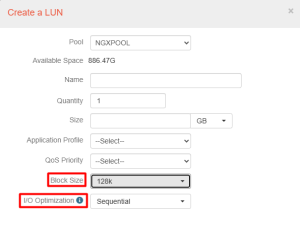
Select “128KB” for block size and “Sequential” for I/O optimization.
4. File Storage: NFS and SMB
NGX Storage supports file-level access through NFS and SMB for backup applications that support file-based repositories.
4.1 Network and Share Configuration
The following recommendations apply to both NFS and SMB deployments:
Network Configuration
-
Use a dedicated network or VLAN for storage traffic where practical.
-
Configure jumbo frames consistently across the complete data path, including the backup server, network switches and NGX Storage interfaces.
-
Use LACP for network interface aggregation where supported. Refer to KB article below to configure LACP correctly.
Network Resilience with LACP in NGX Storage
Share Configuration
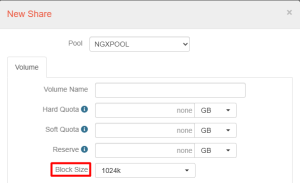
Select “1024k” for block size parameter while creating share.
4.3 NFS Client Configuration
Configure NFS mount parameters according to the selected NFS protocol version and client operating system.
For backup workloads, consider the following:
-
Use “nconnect=16” parameter while mounting NFS export on Linux client.
Refer to links below to to learn more about nconnect parameter and general NFS recommendations.
Improving NFS Read Performance with “nconnect”
NFS Client Configuration Best Practices on Linux — NGX Storage
5. Object Storage
NGX Storage S3-compatible object storage can be used by backup applications that support S3 repositories.
5.1 Share Configuration
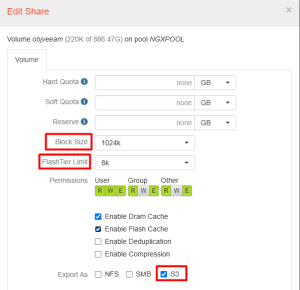
When creating the share and exporting it through S3, configure block size to 1024k the Flash Tier limit to 8k.
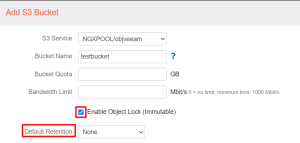
5.2 Object Lock and Immutability
If immutable object storage is required:
-
Enable Object Lock (immutable) when creating S3 bucket.
-
Configure the default retention period to none since backup application will manage the retention of backup files on application level.
Final Note:
The recommendations provided in this document cover storage-side configuration and best practices for backup workloads. However, users should also review the official best practices and configuration guidelines published by their backup software vendor (e.g., Veeam, Commvault, or other backup solutions) to ensure that the backup application, operating system, and network are configured optimally and operate in accordance with the vendor’s recommendations.
COPYRIGHT
© 2025 NGX Teknoloji A.Ş. (NGX Storage). All rights reserved. Printed in the Turkey. Specifications subject to change without notice. No part of this document covered by copyright may be reproduced in any form or by any means-graphic, electronic, or mechanical, including photocopying, recording, taping, or storage in an electronic retrieval system-without prior written permission of NGX Storage. Software derived from copyrighted NGX Storage material is subject to the following license and disclaimer:
THIS SOFTWARE IS PROVIDED BY NGX Storage “AS IS” AND WITHOUT ANY EXPRESS OR IMPLIED WARRANTIES, INCLUDING, BUT NOT LIMITED TO, THE IMPLIED WARRANTIES OF MERCHANTABILITY AND FITNESS FOR A PARTICULAR PURPOSE, WHICH ARE HEREBY DISCLAIMED. IN NO EVENT SHALL NGX Storage BE LIABLE FOR ANY DIRECT, INDIRECT, INCIDENTAL, SPECIAL, EXEMPLARY, OR CONSEQUENTIAL DAMAGES (INCLUDING, BUT NOT LIMITED TO, PROCUREMENT OF SUBSTITUTE GOODS OR SERVICES; LOSS OF USE, DATA, OR PROFITS; OR BUSINESS INTERRUPTION) HOWEVER CAUSED AND ON ANY THEORY OF LIABILITY, WHETHER IN CONTRACT, STRICT LIABILITY, OR TORT (INCLUDING NEGLIGENCE OR OTHERWISE) ARISING IN ANY WAY OUT OF THE USE OF THIS SOFTWARE, EVEN IF ADVISED OF THE POSSIBILITY OF SUCH DAMAGE.
NGX Storage reserves the right to change any products described herein at any time, and without notice. NGX Storage assumes no responsibility or liability arising from the use of products described herein, except as expressly agreed to in writing by NGX Storage. The use or purchase of this product does not convey a license under any patent rights, trademark rights, or any other intellectual property rights of NGX Storage.
TRADEMARK
NGX Storage and the NGX Storage logo are trademarks of NGX TEKNOLOJI A.Ş. Other company and product names may be trademarks of their respective owners.