NFS Client Configuration Best Practices on Linux
NFS Client Configuration Best Practices on Linux
1. RPC (Remote Procedure Call)
1.1 Overview
RPC is when a computer program causes a procedure to execute in a different address space — commonly on another computer on a shared network — which is coded as if it were a normal local procedure call. The programmer writes essentially the same code whether the subroutine is local or remote. This is a form of client–server interaction, typically implemented via a request–response message-passing system.
1.2 RPC Flow Diagram
A single RPC call involves the following components in sequence:
|
Client Application |
→ |
Client Stub |
→ |
Network (TCP/UDP) |
→ |
Server Stub |
→ |
Server Procedure |
Client-side stub: The client application makes a local call; the stub serializes it into a network message.
Server-side stub: Deserializes the incoming message, invokes the actual server procedure, and packages the result for return.
1.3 Key Characteristics
-
RPC is a request–response protocol and is therefore synchronous by default
-
The client is blocked until the server finishes processing
-
Asynchronous requests can be sent to avoid blocking the client
-
Different implementations produce mutually incompatible RPC protocols
2. NFS (Network File System)
2.1 Overview
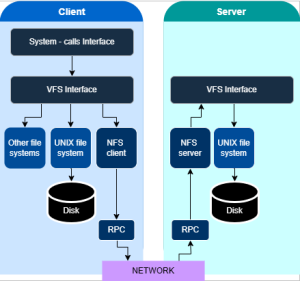
NFS is defined as a set of RPCs — including their arguments, results, and effects. RPC makes the NFS protocol transparent to applications. Since RPC is stateless, the server does not retain RPC state once a request has been served. Each RPC contains all information needed to complete the call. In the event of server failure, the client must resubmit requests.
-
The most widely used versions are NFSv3 and NFSv4
-
This document focuses primarily on NFSv3
2.2 Portmap (rpcbind)
RPC makes remote calls appear local to the client application with the help of portmap. The utility for portmap is rpcbind (formerly called portmap on older systems). The rpcbind service must run on both the NFS client and NFS server.
Port 111 — the fixed port where rpcbind always listens. Other NFS-related services may be hosted on different (dynamically assigned) ports on the server.
Notable RPC program numbers (as defined in RFC 5531):
-
100003 → nfs
-
100005 → mountd
-
100021 → nlockmgr
Portmap Sequence Diagram
The portmap sequence during an NFS mount proceeds as follows:
|
NFS Client |
Port 111 (rpcbind) |
NFS Server |
|
1. Send RPC Program # |
→ Send program number |
|
|
← Return port number |
2. Return port number |
|
|
3. Connect to port |
→ Establish connection |
|
|
← RPC response |
4. Process & respond |
Useful diagnostic commands:
# rpcinfo -p <nfs_server_hostname>
ngx@ubuntu-srv:~$ rpcinfo -p 172.16.20.10

program vers proto port service

100000 4 tcp 111 portmapper

100000 3 tcp 111 portmapper

100000 2 tcp 111 portmapper

100000 4 udp 111 portmapper

100000 3 udp 111 portmapper

100000 2 udp 111 portmapper

100000 4 7 111 portmapper

100000 3 7 111 portmapper

100000 2 7 111 portmapper

100003 2 tcp 2049 nfs

100003 3 tcp 2049 nfs

100024 1 udp 748 status

100024 1 tcp 748 status

100021 0 udp 980 nlockmgr

100021 0 tcp 603 nlockmgr

100021 1 udp 980 nlockmgr

100021 1 tcp 603 nlockmgr

100021 3 udp 980 nlockmgr

100021 3 tcp 603 nlockmgr

100021 4 udp 980 nlockmgr

100021 4 tcp 603 nlockmgr

100005 1 udp 904 mountd

100005 3 udp 904 mountd

100005 1 tcp 904 mountd

100005 3 tcp 904 mountd
# showmount -e <nfs_server_hostname>
ngx@ubuntu-srv:~$ showmount -e 172.16.20.10

Export list for 172.16.20.10:

/exports/NGXPOOL/NGX (everyone)
2.3 File Handle
NFS uses file handles (fhandle) to represent files. This mechanism is superior to pathnames for three reasons:
-
File handles have a fixed length (32 bytes)
-
If a file is renamed, its file handle reference remains unchanged
-
If a file is deleted and a new file is created at the same path, a new file handle is generated
2.4 Locking
NFSv3 does not include a built-in locking mechanism within the core protocol itself. Instead, locking in NFSv3 is handled by a separate, ancillary protocol suite that operates alongside the main NFS service. This design decision reflects the stateless nature of NFSv3 and the architectural separation of concerns between file access and file locking.
2.4.1 NFSv3 Locking Architecture Overview
In NFSv3 environments, file locking is delegated to the Network Lock Manager (NLM) protocol, which is defined in RFC 1813 companion specifications and implemented as part of the broader NFS infrastructure. NLM operates on top of ONC RPC (Open Network Computing Remote Procedure Call) and communicates with the Network Status Monitor (NSM) to provide crash recovery semantics.
The locking subsystem in NFSv3 consists of three primary components:
-
Network Lock Manager (NLM / rpc.lockd): Handles LOCK, UNLOCK, TEST, and CANCEL operations via RPC calls between the NFS client and server daemons.
-
Network Status Monitor (NSM / rpc.statd): Monitors the liveness of NFS peers and facilitates lock reclamation after a client or server crash/reboot.
-
Portmapper / rpcbind: Provides the service endpoint registration and discovery for both NLM and NSM on their respective RPC program numbers.
2.5 NFS Procedures
NFS defines the following RPC procedures:
|
Procedure |
Description |
|
GETATTR(fh) |
Returns the attributes of a file, similar to the stat syscall |
|
SETATTR(fh, attr) |
Sets file attributes (mode, uid, gid, size, atime, mtime); size=0 truncates the file |
|
STATFS(fh) |
Returns file system status: block size, number of free blocks (used by df) |
|
LOOKUP(dirfh, name) |
Returns the fhandle and attributes for the named file in the specified directory |
|
READ(fh, offset, count) |
Reads from a file at the given offset; up to 8192 bytes in v2, larger in v3 |
|
WRITE(fh, offset, count, data) |
Writes to a file; returns updated file attributes after the write |
|
CREATE(dirfh, name, attr) |
Creates a file in the directory; returns new fhandle and attributes |
|
REMOVE(dirfh, name) |
Deletes the named file from directory dirfh and returns status |
|
RENAME(dirfh, name, tofh, toname) |
Renames a file in one directory to a new name in another directory |
|
LINK(dirfh, name, tofh, toname) |
Creates a hard link toname in directory tofh pointing to name in dirfh |
|
SYMLINK(dirfh, name, string) |
Creates a symbolic link name in directory dirfh with the given value |
|
READLINK(fh) |
Reads a symbolic link and returns the target file name |
|
MKDIR(dirfh, name, attr) |
Creates a directory; returns new fhandle and attributes |
|
RMDIR(dirfh, name) |
Removes the named directory from parent directory dirfh |
|
READDIR(dirfh, cookie, count) |
Reads directory entries; cookie=0 starts at first entry, used for pagination |
|
NULL |
No operation — used for testing only |
|
ACCESS |
Assists with client-side caching decisions |
|
MKNOD |
Creates a device special file |
|
FSINFO |
Returns information about the server’s capabilities |
|
READDIRPLUS |
Returns file handles and attributes together to eliminate extra LOOKUP calls |
|
COMMIT |
Flushes async writes to stable storage; used with write verifier for data integrity |
2.6 Asynchronous Writes and the Write Verifier
The addition of the COMMIT procedure in NFSv3 enables improved write performance over synchronous writes. Asynchronous writes require extra coordination to guarantee data integrity in the event of a server crash. For this purpose, NFSv3 uses a write verifier — an 8-byte value the server must change if it restarts.
Write Verifier Flow
|
1 Send async WRITE RPC |
→ |
2 Server replies with verifier1 |
→ |
3 Send COMMIT RPC, receive verifier2 |
→ |
4 verifier1 == verifier2? Yes: OK No: Rewrite! |
-
After an async write, the WRITE RPC reply includes verifier1 — the client stores this value
-
The client then sends a COMMIT RPC and receives verifier2 in the reply
-
The client compares the two verifiers: a mismatch indicates a server crash; all uncommitted data must be rewritten
-
The client must retain all uncommitted data in memory until a successful COMMIT is confirmed
3. Additional Daemon Processes
Beyond the three essential services (nfs, rpcbind, and nfslock), several auxiliary processes facilitate NFS operation:
|
Process |
Description |
|
rpc.mountd |
Processes MOUNT requests from NFSv3 clients; verifies the share is exported and the client is authorized |
|
rpc.nfsd |
Defines NFS versions and protocols advertised by the server; provides per-client server threads |
|
rpc.lockd |
Implements the NLM protocol, allowing NFSv3 clients to lock files on the server |
|
rpc.statd |
Implements the NSM protocol; notifies NFS clients when the server restarts unexpectedly. Not used in NFSv4 |
|
rpc.rquotad |
Provides user quota information for remote users |
4. NGX Storage and NFS Architecture
4.1 About the NGX Storage System
The core components of the NGX Storage architecture are as follows:
|
Components |
Description |
|
Storage Pool |
A logical storage pool created from physical disks. RAID policies are defined at this layer. |
|
Share |
A logical unit created within a pool for NFS access. |
|
NFS Export Path |
An access point where a share is exposed externally via the NFS protocol. |
|
Access Control List (ACL) |
A rule set that determines which client IPs or subnets are allowed to access the export. |
4.2 The Operating Model of the NFS Service in NGX Storage
On the NGX Storage system, every NFS share is exported using a standardized directory structure. This design improves manageability and clearly defines the relationship between storage pools and shares.
All export operations follow the base format below:
In this structure:
-
<Data_IP> → IP address assigned for file protocol access.
-
/exports/ → The root directory for all NFS exports. Every filesystem shared externally is organized under this path.
-
<PoolName> → Represents the storage pool where the share resides. This layer corresponds to the physical disk groups and RAID configuration.
-
<ShareName> → The logical NFS share created within the pool. This is the actual exported data entity accessed by clients.
📌 Example
In this example:
-
“172.16.20.10” is IP address assigned for file protocol access
-
NgxPool is the storage pool name
-
TrainingShare is the NFS share created inside that pool
⚠️ Important Note
If this path structure is not correctly known or used, mount attempts will fail. In such cases, the NFS client may encounter errors such as:
-
“No such file or directory”
-
“Connection timed out”
-
“Mount failed”
Therefore, verifying the correct export path on the NGX Storage system before performing any mount operation is essential. You can use below command.
showmount -e <server_ip>
5. NGX Storage Configuration
5.1 Enabling the NFS Service
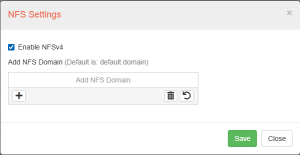
By default, the NGX Storage system comes with NFSv3 enabled and active out of the box. This allows immediate compatibility with legacy and standard NFS client environments without additional configuration.
If required, NFSv4 support can also be enabled manually through the NGX management interface. Enabling NFSv4 provides additional features such as improved security, stateful operations, and better performance in modern environments.
5.2 Creating an NFS Share (Export)
In the NGX Storage management interface, a new NFS share can be created by following the path:
Shares > Shares > New Share
This operation is a simplified workflow that automatically handles both share creation and NFS export definition in a single step.
During this process:
-
The share is assigned to an existing storage pool
-
The NFS export path is automatically generated
-
Access parameters (such as protocol and permissions) are defined
After completion, the share becomes immediately available for NFS client access according to the configured export rules.
New Share Screen
As shown in the figure below, the following parameters are configured in the NGX Storage share creation screen:
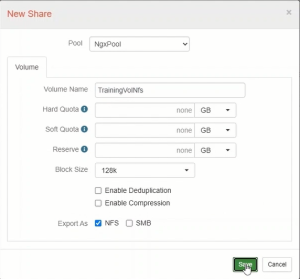
Configuration Parameters
|
Parameter |
Description |
|
Pool |
The storage pool where the share will be created. Example: NgxPool |
|
Volume Name |
The name of the volume to be created. This name is included in the export path. Example: TrainingVolNfs |
|
Hard Quota |
Hard Quota is the limit of space, a dataset and all snapshots of that dataset can occupy. |
|
Soft Quota |
Soft Quota is the space only occupied by dataset, snapshots are not included in Soft Quota. |
|
Reserve |
Reservation guarantees the amount of data will be reserved for that dataset and it’s snapshots. |
|
Block Size |
The internal block size of the volume. 128K is recommended for large files, while 4K–16K is recommended for small files. |
|
Enable Deduplication |
Ensures that identical blocks are stored only once. |
|
Enable Compression |
Block-level compression. |
|
Export As: NFS |
Export this volume using the NFS protocol. |
Edit Share Screen – Volume Tab
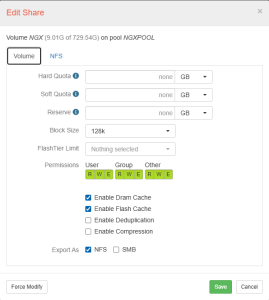
To modify an existing share, the Edit Share dialog is opened. The Volume tab allows the following settings to be configured:
-
Hard Quota, Soft Quota, and Reserve values can be defined in GB.
-
Block Size can be selected (default: 128k).
-
FlashTier Limit can be specified.
-
Permissions: Read (R), Write (W), and Execute (E) permissions can be set for User, Group, and Other.
-
Enable DRAM Cache and Enable Flash Cache options can be activated.
-
Enable Deduplication and Enable Compression can be optionally enabled.
-
Export As: NFS and/or SMB protocols can be selected.
Edit Share Screen – NFS Tab
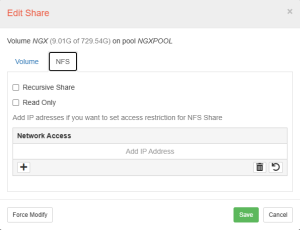
The NFS tab is used to configure access control for the NFS share. The following options are available:
-
Recursive Share: Includes subdirectories within the scope of the share.
-
Read Only: Defines the share in read-only mode.
-
Network Access: IP addresses can be added to set access restrictions for the NFS share. If left empty, access is allowed from all networks.
Case 1 – Open Access (No IP Restriction)
In this scenario, the Network Access field is left empty. No IP address restrictions are applied to the NFS share, and access is granted to all hosts on the network.
|
Setting |
Value / Result |
|
Network Access field |
(empty – no restriction) |
|
Accessible by |
All hosts on the network |
|
showmount output |
/exports/NGXPOOL/NGX (everyone) |
The following screenshot shows the NFS tab with the Network Access field left empty:
After saving, running showmount -e 172.16.20.10 on the client confirms open access:
ngx@ubuntu-srv:~$ showmount -e 172.16.20.10
Export list for 172.16.20.10:
/exports/NGXPOOL/NGX (everyone)
|
The (everyone) tag in the showmount output confirms that the share is accessible to all hosts without any IP restriction. This configuration is suitable for internal development or test environments. |
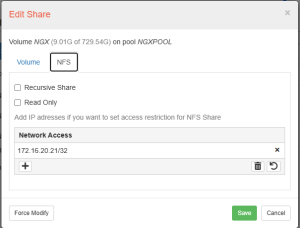
Case 2 – Restricted Access (Specific IP: 172.16.20.21/32)
In this scenario, the IP address 172.16.20.21/32 is added to the Network Access field. Only the specified host is permitted to mount the NFS share; all other hosts are denied.
|
Setting |
Value / Result |
|
Network Access field |
172.16.20.21/32 |
|
Accessible by |
Only host at 172.16.20.21 |
|
showmount output |
/exports/NGXPOOL/NGX 172.16.20.21 |
The following screenshot shows the NFS tab with 172.16.20.21/32 added to Network Access:
After saving, running showmount -e 172.16.20.10 confirms the restriction is applied:
ngx@ubuntu-srv:~$ showmount -e 172.16.20.10

Export list for 172.16.20.10:

/exports/NGXPOOL/NGX 172.16.20.21
|
Instead of (everyone), only the specific IP address 172.16.20.21 is listed. This confirms that access has been successfully restricted to that single host. This configuration is recommended for production and secure environments. |
6. Linux NFS Mount Process: End-to-End
6.1 Prerequisites
Before mounting, ensure the required packages and services are in place:
RHEL / CentOS / Rocky / Alma
# Install NFS client utilities
sudo dnf install -y nfs-utils
Ubuntu / Debian
# Install NFS common package
sudo apt-get install -y nfs-common
6.2 Verifying Server Exports
Before mounting, confirm the server is exporting the desired path and that your client is permitted:
# NFSv3: query the server’s mountd for available exports
showmount -e <server_ip>
6.3 Manual Mount
NFSv3 Mount
The following command mounts a remote NFS export to a local directory using the NFSv3 protocol:
mount -t nfs -o vers=3,tcp,hard,intr,rsize=131072,wsize=131072\<server_ip>:/export/data /mnt/nfs_data
Each option and its purpose are described below:
|
Parameter |
Description |
|
-t nfs |
Specifies the filesystem type as NFS. |
|
vers=3 |
Forces NFSv3. |
|
tcp |
Uses TCP as the transport layer. |
|
hard |
If the server becomes unreachable, the client retries indefinitely. Ensures data integrity. |
|
rsize |
Read block size |
|
wsize |
Write block size |
|
<server_ip>:/export/data |
Remote server IP address and the exported directory path on the server. |
|
/mnt/nfs_data |
Local mount point where the remote filesystem will be attached. |
|
STEP 1: Create the Mount Point |
|
The local mount point directory must exist before mounting:
Skip this step if the directory already exists. |
ngx@ubuntu-srv:~$ sudo mkdir -p /mnt/nfs_mount

ngx@ubuntu-srv:~$ ls -ld/mnt/nfs mount

drwxrwxrwx 2 root root 6 Apr 28 13:42 mnt/nfs mount
|
STEP 2: Run the Mount Command |
|
Execute the command as root or with sudo:
If the command completes without output, the mount was successful. |
ngx@ubuntu-srv:~$ sudo mount -t nfs -o vers=3, tcp, hard, intr, rsize=131072,wsize=131072

172.16.20.10:/exports/NGXPOOL/NGX/mnt/nfs_mount
|
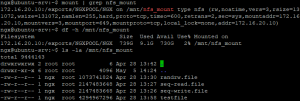
STEP 3: Verify the Mount |
|
List mounted filesystems and check disk usage:
Browse the remote directory contents:
|
6.4 Persistent Mount via /etc/fstab
To survive reboots, add the mount to /etc/fstab. Choose options carefully for your workload:
# /etc/fstab entry
<server_ip>:/export/data /mnt/nfs_data nfs vers=3,hard,nointr,bg,\
rsize=131072,wsize=131072,timeo=600,retrans=2,_netdev 0 0
Key fstab mount options explained:
-
hard (vs soft): A hard mount retries indefinitely when the server becomes unreachable. A soft mount returns an I/O error after retrans attempts. Always use hard for production workloads to prevent silent data corruption.
-
bg (background): If the initial mount attempt fails, retry in the background. Prevents boot hangs when the NFS server is temporarily unavailable.
-
_netdev: Tells systemd that this mount requires the network to be up. Without it, the system may attempt to mount before networking is ready.
-
rsize / wsize: Read and write buffer sizes in bytes.
-
timeo: Timeout value in tenths of a second before the first retransmission (for TCP, this is the initial value; the kernel applies exponential backoff). 600 = 60 seconds.
-
retrans: Number of minor retransmissions before a major timeout (which triggers a new socket reconnect for TCP). Default is 2.
7. Performance-Focused Configuration
7.1 nconnect – Parallel TCP Connections
The nconnect mount option (available since Linux kernel 5.3) creates multiple TCP connections to the same NFS server, distributing RPC requests across them. This is one of the highest-impact tuning parameters for NFS performance, especially on high-bandwidth links (10GbE+) where a single TCP flow cannot saturate the pipe.
# Mount with 8 parallel TCP connections (recommended for 10GbE+)
mount -t nfs4 -o vers=4.2,hard,nconnect=8,rsize=131072,wsize=131072\<server>:/export/data /mnt/nfs_data
Guidelines for nconnect:
-
Maximum value: 16 (kernel-enforced limit).
-
Recommended starting point: nconnect=8 for 10GbE; nconnect=16 for 25GbE or faster.
-
Verify connection count: Check with ss -tn sport = :2049 or netstat -tn | grep 2049 to confirm multiple TCP flows.
COPYRIGHT
© 2025 NGX Teknoloji A.Ş. (NGX Storage). All rights reserved. Printed in the Turkey. Specifications subject to change without notice. No part of this document covered by copyright may be reproduced in any form or by any means-graphic, electronic, or mechanical, including photocopying, recording, taping, or storage in an electronic retrieval system-without prior written permission of NGX Storage. Software derived from copyrighted NGX Storage material is subject to the following license and disclaimer:
THIS SOFTWARE IS PROVIDED BY NGX Storage “AS IS” AND WITHOUT ANY EXPRESS OR IMPLIED WARRANTIES, INCLUDING, BUT NOT LIMITED TO, THE IMPLIED WARRANTIES OF MERCHANTABILITY AND FITNESS FOR A PARTICULAR PURPOSE, WHICH ARE HEREBY DISCLAIMED. IN NO EVENT SHALL NGX Storage BE LIABLE FOR ANY DIRECT, INDIRECT, INCIDENTAL, SPECIAL, EXEMPLARY, OR CONSEQUENTIAL DAMAGES (INCLUDING, BUT NOT LIMITED TO, PROCUREMENT OF SUBSTITUTE GOODS OR SERVICES; LOSS OF USE, DATA, OR PROFITS; OR BUSINESS INTERRUPTION) HOWEVER CAUSED AND ON ANY THEORY OF LIABILITY, WHETHER IN CONTRACT, STRICT LIABILITY, OR TORT (INCLUDING NEGLIGENCE OR OTHERWISE) ARISING IN ANY WAY OUT OF THE USE OF THIS SOFTWARE, EVEN IF ADVISED OF THE POSSIBILITY OF SUCH DAMAGE.
NGX Storage reserves the right to change any products described herein at any time, and without notice. NGX Storage assumes no responsibility or liability arising from the use of products described herein, except as expressly agreed to in writing by NGX Storage. The use or purchase of this product does not convey a license under any patent rights, trademark rights, or any other intellectual property rights of NGX Storage.
TRADEMARK
NGX Storage and the NGX Storage logo are trademarks of NGX TEKNOLOJI A.Ş. Other company and product names may be trademarks of their respective owners.