Using NGX Storage as Veeam Hardened Repository
1) About Veeam Hardened Repository
To protect your backup files from loss as a result of malware activity or unplanned actions, you can add a hardened repository based on a Linux server to your backup infrastructure.
A hardened repository supports the following features:
- Immutability: when you add a hardened repository, you specify the time period while backup files must be immutable. During this period, backup files stored in this repository cannot be moved, modified or deleted, but can be copied.
- Secure Authentication: when you add a hardened repository, you specify the method used to authenticate connections.
-
- Certificate-based: No user name or password is required; authentication is performed using certificates. It is recommended for environments where Kerberos is disabled or unavailable, or for enhanced security. This option is available for hardened repositories deployed from the Veeam Infrastructure Appliance.
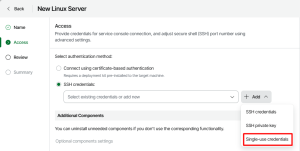
- Single-use credentials: Credentials that are used only once to deploy Veeam Data Mover, while adding the Linux server to the backup infrastructure. These credentials are not stored in the backup infrastructure. Even if the Veeam Backup & Replication server is compromised, the attacker cannot get the credentials and connect to the hardened repository.
2) Hardened Repository and NGX Storage Architecture
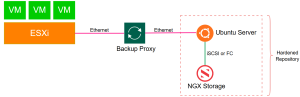
Below architecture shows NGX Storage providing a block storage LUN (via iSCSI or Fibre Channel) to an Ubuntu Linux server, which is then configured as a Veeam Hardened Repository. Backup data flows from the ESXi hosts through the Backup Proxy over Ethernet, and the Linux server writes this data directly to the NGX block device. In this design, NGX Storage supplies the high-performance and reliable block storage layer, while the Linux server provides the immutability and security features required for a Veeam Hardened Repository.
3) Configuring NGX Storage
This section describes the steps to create iSCSI target and LUNs on NGX Storage.
3.1. LUN Creation
Create a LUN of required size as shown below.

3.2. iSCSI Target Creation and LUN Assignment
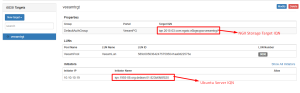
Create an iSCSI target and assign newly created LUN.
4) Preparing Ubuntu Server
Install, configure and secure Ubuntu 20.04 server according to Veeam recommendations.
4.1. Installation
Follow the instructions from Veeam documentation except “storage configuration of backup data storage (step 9.2)” as we will use external block storage (LUN from NGX Storage).
https://helpcenter.veeam.com/archive/backup/120/vsphere/hardened_repository_ubuntu_install.html
4.2. Configuration
4.2.1. Mapping the LUN to Ubuntu server.
Follow below steps to map and format the LUN on Ubuntu Server.
ngx@hrd-rep-ubt:~$ sudo iscsiadm -m discovery -t sendtargets -p 10.10.10.20
ngx@hrd-rep-ubt:~$ sudo iscsiadm -m node -T iqn.2015-03.com.ngxio.v6bgwypa:veeamtrgt -p 10.10.10.20:3260 --login
ngx@hrd-rep-ubt:~$ lsblk
sdb 8:16 0 200G 0 disk
└─mpatha 253:0 0 200G 0 mpath
ngx@hrd-rep-ubt:~$ sudo mkfs.xfs /dev/mapper/mpatha
ngx@hrd-rep-ubt:~$ sudo mount /dev/mapper/mpatha /mnt/hardrep
ngx@hrd-rep-ubt:~$ df -h
Filesystem          Size  Used Avail Use% Mounted on
/dev/mapper/mpatha  200G  1.5G  199G   1% /mnt/hardrep
Note1: XFS is the recommended filesystem to be used.
Note2: iSCSI or FC can be used for storage connection. NFS and SMB is not supported as immutability relies on filesystem attributes.
4.2.2. Modify Access Rights to Backup Directory
Allow access only for user account created during installation with following commands.
To assign the directory’s owner:
ngx@hrd-rep-ubt:~$ sudo chown -R ngx:ngx /mnt/hardrep
*Both owner and group must be the user account you created during the installation.
To allow access to the directory only for its owner and the root account
ngx@hrd-rep-ubt:~$ sudo chmod 700 /mnt/hardrep
4.2.3. Configuring DISA STIG Compliance for Ubuntu Linux Server
You can check how to apply DISA STIG Compliance steps manually via the URL below. https://helpcenter.veeam.com/archive/backup/120/vsphere/hardened_repository_ubuntu_configuring_stig.html
There is also a script provided by Veeam which completes this steps automatically. You can download the script via the URL below.
https://github.com/VeeamHub/veeam-hardened-repository/blob/master/veeam.harden.sh
After downloading, run the script on Ubuntu server as shown below.
ngx@hrd-rep-ubt:/mnt$ sudo ./veeamscript.sh
[+] Veeam DISA STIG automated hardening process started
 [+] apt update and upgrade
 [+] V-238200: operating system must allow users to directly initiate a session lock for all connection types
 [+] V-238371: operating system must use a file integrity tool to verify correct operation of all security functions
 [+] V-238298: operating system must produce audit records and reports containing information
 [+] V-238326: operating system must not have the telnet package installed
 [+] V-238327: operating system must not have the rsh-server package installed
  .
  .
  .
  .
  .
 [+] Veeam DISA STIG automated hardening process finished
5) Configuring Hardened Repository on Veeam
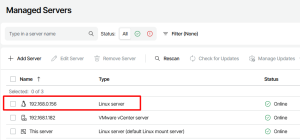
5.1. Adding Linux Server to Managed Servers
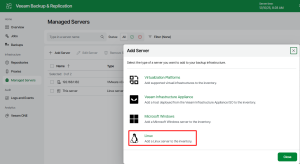
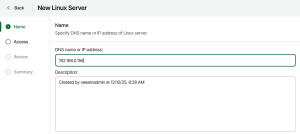
For SSH credentials, “Single-use credentials” option must be selected.
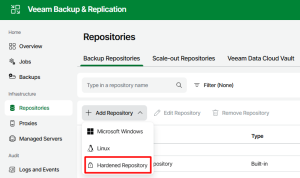
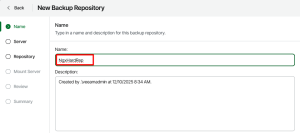
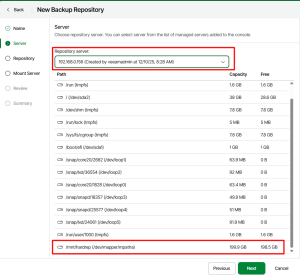
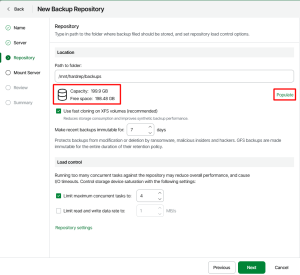
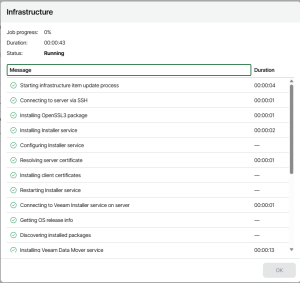
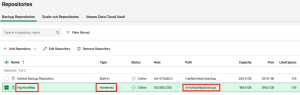
5.2. Adding Hardened Repository
5.3. Removing the User Account from sudo Group
You need to remove user account from sudo group with the following command.
ngx@hrd-rep-ubt:/mnt$ sudo deluser ngx sudo
COPYRIGHT
© 2025 NGX Teknoloji A.Ş. (NGX Storage). All rights reserved. Printed in the Turkey. Specifications subject to change without notice. No part of this document covered by copyright may be reproduced in any form or by any means-graphic, electronic, or mechanical, including photocopying, recording, taping, or storage in an electronic retrieval system-without prior written permission of NGX Storage. Software derived from copyrighted NGX Storage material is subject to the following license and disclaimer:
THIS SOFTWARE IS PROVIDED BY NGX Storage “AS IS” AND WITHOUT ANY EXPRESS OR IMPLIED WARRANTIES, INCLUDING, BUT NOT LIMITED TO, THE IMPLIED WARRANTIES OF MERCHANTABILITY AND FITNESS FOR A PARTICULAR PURPOSE, WHICH ARE HEREBY DISCLAIMED. IN NO EVENT SHALL NGX Storage BE LIABLE FOR ANY DIRECT, INDIRECT, INCIDENTAL, SPECIAL, EXEMPLARY, OR CONSEQUENTIAL DAMAGES (INCLUDING, BUT NOT LIMITED TO, PROCUREMENT OF SUBSTITUTE GOODS OR SERVICES; LOSS OF USE, DATA, OR PROFITS; OR BUSINESS INTERRUPTION) HOWEVER CAUSED AND ON ANY THEORY OF LIABILITY, WHETHER IN CONTRACT, STRICT LIABILITY, OR TORT (INCLUDING NEGLIGENCE OR OTHERWISE) ARISING IN ANY WAY OUT OF THE USE OF THIS SOFTWARE, EVEN IF ADVISED OF THE POSSIBILITY OF SUCH DAMAGE.
NGX Storage reserves the right to change any products described herein at any time, and without notice. NGX Storage assumes no responsibility or liability arising from the use of products described herein, except as expressly agreed to in writing by NGX Storage. The use or purchase of this product does not convey a license under any patent rights, trademark rights, or any other intellectual property rights of NGX Storage.
TRADEMARK
NGX Storage and the NGX Storage logo are trademarks of NGX TEKNOLOJI A.Ş. Other company and product names may be trademarks of their respective owners.