REST API Create, Endpoints & Examples

NGXStorage REST API v2.4.1
Unified REST API documentation for NGXStorage software 2.4.1. This edition reconciles the older 2.4.0 knowledge-base material with the 2.4.1 OpenAPI export and keeps the content in a WordPress-friendly HTML format.
This edition documents 63 operations across Auth Group, ISCSI Target, Log, LUN, Pool, Share, Portal Group, Snapshot, Status, and Network resources.
Table of Contents
Overview
NGXStorage exposes a bearer-token protected REST API for storage administration and monitoring. The unified reference below combines setup guidance, request examples, and normalized endpoint entries for all operations found in the 2.4.1 OpenAPI export.
Base URL and Authentication
Base URL pattern: https://<storage-host>
- Authentication uses HTTP bearer tokens.
- Send the token in the
Authorizationheader asBearer <API_KEY>. - Replace
<storage-host>with the management IP or DNS name of your NGXStorage system.
Authorization: Bearer <API_KEY>
API Key Creation and Permissions
Step 1
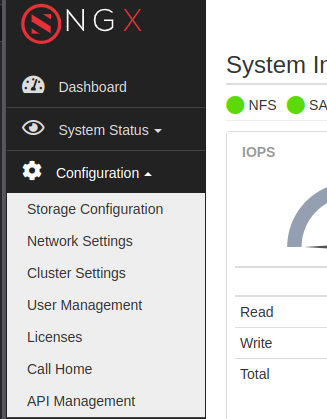
Open Configuration > API Management to reach the API administration screen.
Step 2
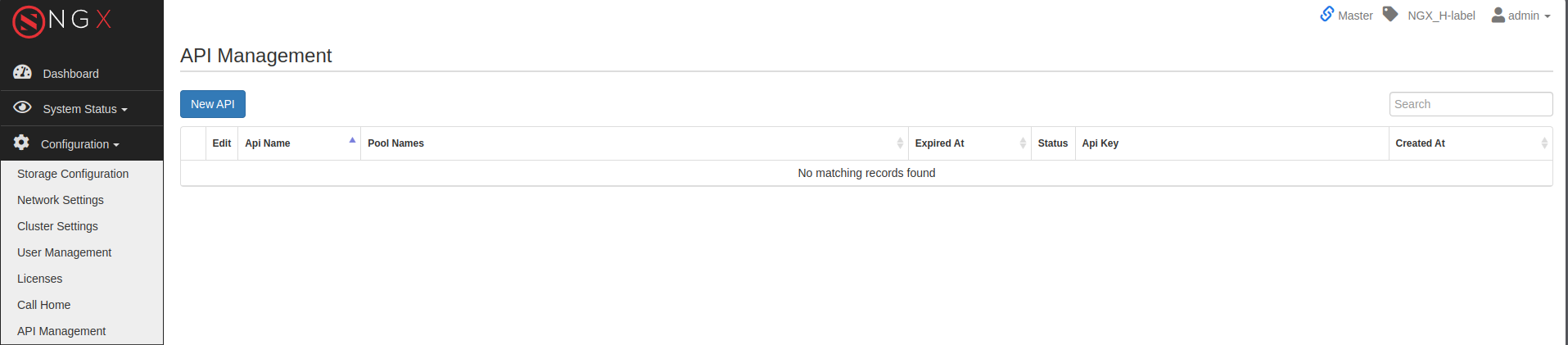
Select New API to create a fresh bearer token.
Step 3
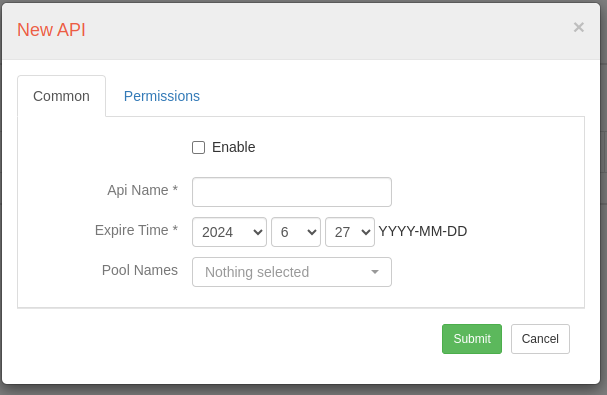
Set enable state, name, expiration time, and authorized pools. If no pools are selected, the key is valid for all pools.
Step 4
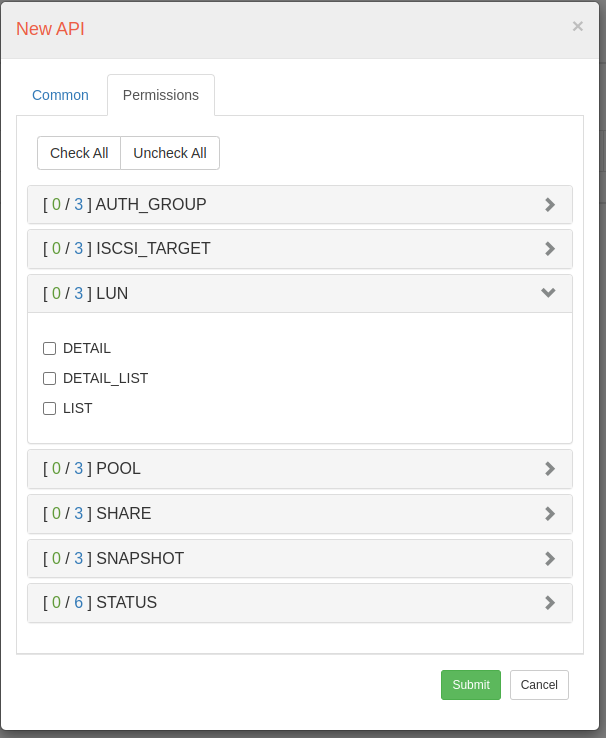
Open the Permissions tab and grant endpoint-level access before saving.
Step 5
Review the generated key in the API Management table.

Step 6
Use Show to display and copy the bearer token value.
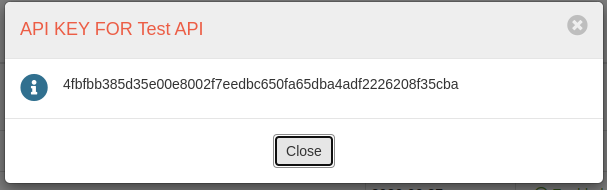
Quick Request Examples
-
Curl
curl \
  --location 'https://<storage-host>/api/v2/pool/<POOL_ID>' \
  --header 'Authorization: Bearer <API_KEY>'
-
Python – requests
import requests headers = { 'Authorization': 'Bearer <API_KEY>', } response = requests.get('https://<storage-host>/api/v2/pool/<POOL_ID>', headers=headers) print(response.json()) -
Go
package main import ( "fmt" "io" "log" "net/http" ) func main() { client := &http.Client{} req, err := http.NewRequest("GET", "https://<storage-host>/api/v2/pool/<POOL_ID>", nil) if err != nil { log.Fatal(err) } req.Header.Set("Authorization", "Bearer <API_KEY>") resp, err := client.Do(req) if err != nil { log.Fatal(err) } defer resp.Body.Close() body, err := io.ReadAll(resp.Body) if err != nil { log.Fatal(err) } fmt.Println(string(body)) } -
PHP
<?php
$ch = curl_init();

curl_setopt($ch, CURLOPT_URL, 'https://<storage-host>/api/v2/pool/<POOL_ID>');
curl_setopt($ch, CURLOPT_RETURNTRANSFER, true);
curl_setopt($ch, CURLOPT_CUSTOMREQUEST, 'GET');
curl_setopt($ch, CURLOPT_HTTPHEADER, [
'Authorization: Bearer <API_KEY>',
]);

$response = curl_exec($ch);
curl_close($ch);

echo $response;
-
JavaScript – Fetch
fetch('https://<storage-host>/api/v2/pool/<POOL_ID>', { headers: { Authorization: 'Bearer <API_KEY>' } }) .then((response) => response.json()) .then((data) => console.log(data)); -
Node.js – Axios
import axios from 'axios';

const response = await axios.get('https://<storage-host>/api/v2/pool/<POOL_ID>', {
  headers: {
Authorization: 'Bearer <API_KEY>'
  }
});

console.log(response.data);
Endpoint Reference
Auth Group
Create
Method: POST
URL: https://<storage-host>/api/v2/auth_group/
Creates a new authentication group by accepting a JSON body with two required properties: `name` (string) and `owner` (string). On success, it returns the unique identifier of the newly created group under `id` along with a string `success` flag.
Success status: 200
Path Parameters
None.
Query Parameters
None.
Body Parameters
| Parameter | Type | Required | Description | Details |
|---|---|---|---|---|
| name | string | yes | none | 1-30 letters or numbers |
| owner | string | yes | none | 1-20 letters, numbers, underscores, or hyphens |
Example Request Body
{
  "name": "new_auth_group",
  "owner": "RSA3Q866_B"
}
Example Success Response
{
  "id": "553bf10cef175f3c3a6d607cfe3987d9d2cce412",
  "success": true
}
Delete
Method: DELETE
URL: https://<storage-host>/api/v2/auth_group/{id}
Deletes the authentication group specified by the path parameter `id` (string). Returns a boolean `success` indicating whether the deletion was successful.
Success status: 200
Path Parameters
| Parameter | Type | Required | Description | Details |
|---|---|---|---|---|
| id | string | yes | none | 5-40 hexadecimal characters |
Query Parameters
None.
Body Parameters
None.
Example Success Response
{
  "success": true
}
Change Name
Method: PATCH
URL: https://<storage-host>/api/v2/auth_group/{id}
Updates the name and owner of an existing authentication group identified by `id`. The JSON body must include both `name` (string) and `owner` (string). Returns a boolean `success` on completion.
Success status: 200
Path Parameters
| Parameter | Type | Required | Description | Details |
|---|---|---|---|---|
| id | string | yes | none | 5-40 hexadecimal characters |
Query Parameters
None.
Body Parameters
| Parameter | Type | Required | Description | Details |
|---|---|---|---|---|
| name | string | yes | none | none |
| owner | string | yes | none | none |
Example Request Body
{
  "name": "asdsadasasdasd!d",
  "owner": "RSA3Q866_A"
}
Example Success Response
{
  "success": true
}
Add CHAP
Method: PATCH
URL: https://<storage-host>/api/v2/auth_group/chap/{id}
Adds or updates CHAP credentials for the authentication group identified by the path parameter `id`. The body requires `username` (string), `password` (string), and `owner` (string). Returns `success: true` if applied.
Success status: 200
Path Parameters
| Parameter | Type | Required | Description | Details |
|---|---|---|---|---|
| id | string | yes | none | 5-40 hexadecimal characters |
Query Parameters
None.
Body Parameters
| Parameter | Type | Required | Description | Details |
|---|---|---|---|---|
| username | string | yes | none | none |
| password | string | yes | none | none |
| owner | string | yes | none | none |
Example Request Body
{
  "username": "<string>",
  "password": "<string>",
  "owner": "<string>"
}
Example Success Response
{
  "success": true
}
Delete CHAP
Method: DELETE
URL: https://<storage-host>/api/v2/auth_group/chap/{id}
Removes CHAP credentials from the authentication group identified by `id`. Returns a boolean `success` indicating the result.
Success status: 200
Path Parameters
| Parameter | Type | Required | Description | Details |
|---|---|---|---|---|
| id | string | yes | none | 5-40 hexadecimal characters |
Query Parameters
None.
Body Parameters
None.
Example Success Response
{
  "success": true
}
Add IQN
Method: PATCH
URL: https://<storage-host>/api/v2/auth_group/iqn/{id}
Registers an iSCSI initiator IQN to the authentication group `id`. The request body must include `iqn` (string), `iqn_alias` (string), and `owner` (string). On success, returns the newly added IQN’s `id` and `success: true`.
Success status: 200
Path Parameters
| Parameter | Type | Required | Description | Details |
|---|---|---|---|---|
| id | string | yes | none | 5-40 hexadecimal characters |
Query Parameters
None.
Body Parameters
| Parameter | Type | Required | Description | Details |
|---|---|---|---|---|
| owner | string | yes | none | none |
| iqn | string | yes | none | none |
| iqn_alias | string | yes | none | none |
Example Request Body
{
  "iqn": "iqn.1993-08.org.debian.iscsi:01:107dc7e4254a",
  "iqn_alias": "TEST",
  "owner": "SGZ1RVC2_A"
}
Example Success Response
{
  "id": "4c26db3b6d4a9dd66e8f1ffcd8dd6c8278f8e6d1",
  "success": true
}
Delete IQN
Method: DELETE
URL: https://<storage-host>/api/v2/auth_group/iqn/{iqn_id}/
Deletes the iSCSI initiator IQN specified by `iqn_id` (string) from its authentication group. Returns an empty object on success.
Success status: 200
Path Parameters
| Parameter | Type | Required | Description | Details |
|---|---|---|---|---|
| iqn_id | string | yes | none | 5-40 hexadecimal characters |
Query Parameters
None.
Body Parameters
None.
Detail
Method: GET
URL: https://<storage-host>/api/v2/auth_group/{id}
Fetches detailed information for the authentication group specified by `id`. The response includes CHAP settings (`chap` object with `username` and `password`), `chap_status` (integer), the group’s `initiator` list, as well as `group_id`, `group_name`, and `owner`.
Success status: 200
Path Parameters
| Parameter | Type | Required | Description | Details |
|---|---|---|---|---|
| id | string | yes | none | up to 40 characters |
Query Parameters
None.
Body Parameters
None.
Example Success Response
{
  "chap": {
    "password": "chfsgsdf435345",
    "username": "dddggg"
  },
  "chap_status": 1,
  "group_id": "59f5004ecb2944f1b456c904f2e9ee9e541c31bb",
  "group_name": "sisitv",
  "initiator": [
    {
      "id": "aa5fce737911a2686ca219a71c8e784e8116623b",
      "iqn": "iqn.2016-04.com.open-iscsi:751a7fe0b28",
      "iqn_alias": "asdas"
    }
  ],
  "owner": "RSA3Q866_A"
}
Detail List
Method: GET
URL: https://<storage-host>/api/v2/auth_group/list
Provides detailed listings for all authentication groups, including CHAP status, initiators, and ownership for each group. No parameters are needed.
Success status: 200
Path Parameters
None.
Query Parameters
None.
Body Parameters
None.
Example Success Response
[
  {
    "group_id": "1",
    "group_name": "DefaultAuthGroup"
  },
  {
    "chap": {
      "password": "qaxwscedrfv4",
      "username": "muslum"
    },
    "chap_status": 1,
    "group_id": "8e60d81b35c914076015c62845fe5112baf60985",
    "group_name": "test",
    "initiator": [],
    "owner": "RSA3Q866_A"
  },
  {
    "chap": {
      "password": "chfsgsdf435345",
      "username": "dddggg"
    },
    "chap_status": 1,
    "group_id": "59f5004ecb2944f1b456c904f2e9ee9e541c31bb",
    "group_name": "sisitv",
    "initiator": [],
    "owner": "RSA3Q866_A"
  },
  {
    "chap_status": 0,
    "group_id": "2d27f92411a99fbb9b93958b63a045162701b603",
    "group_name": "bvfff",
    "initiator": [],
    "owner": "RSA3Q866_A"
  },
  {
    "chap_status": 0,
    "group_id": "f588b53f54169a5b597d1deb380613709abeed39",
    "group_name": "cndrimg49e4e10eadb94762b224e41",
    "initiator": [],
    "owner": "RSA3Q866_A"
  },
  {
    "chap_status": 0,
    "group_id": "d70676a6fed69c7b2c33f429bf283465d566adb1",
    "group_name": "cindere2c2ac2729a84957ba47541f",
    "initiator": [],
    "owner": "RSA3Q866_A"
  },
  {
    "chap_status": 0,
    "group_id": "9ebc3933dcc7824acbf24becf29d0b80cce821e4",
    "group_name": "cinderbac994a4fb66463193f73479",
    "initiator": [
      {
        "id": "fee8c2740b99f4da1671f5a13595a08fde77ad0c",
        "iqn": "iqn.2016-04.com.open-iscsi:751a7fe0b28",
        "iqn_alias": "cinderdevstack01"
      }
    ],
    "owner": "RSA3Q866_A"
  }
]
List
Method: GET
URL: https://<storage-host>/api/v2/auth_group/
Retrieves a list of all authentication groups. No parameters are required. Each entry in the returned array includes `group_id` (string), `group_name` (string) and an `owner` (string).
Success status: 200
Path Parameters
None.
Query Parameters
None.
Body Parameters
None.
Example Success Response
[
  {
    "group_id": "1",
    "group_name": "DefaultAuthGroup"
  },
  {
    "chap": {
      "password": "qaxwscedrfv4",
      "username": "muslum"
    },
    "group_id": "8e60d81b35c914076015c62845fe5112baf60985",
    "group_name": "test",
    "owner": "RSA3Q866_A"
  },
  {
    "chap": {
      "password": "chfsgsdf435345",
      "username": "dddggg"
    },
    "group_id": "59f5004ecb2944f1b456c904f2e9ee9e541c31bb",
    "group_name": "sisitv",
    "owner": "RSA3Q866_A"
  },
  {
    "group_id": "2d27f92411a99fbb9b93958b63a045162701b603",
    "group_name": "bvfff",
    "owner": "RSA3Q866_A"
  },
  {
    "group_id": "f588b53f54169a5b597d1deb380613709abeed39",
    "group_name": "cndrimg49e4e10eadb94762b224e41",
    "owner": "RSA3Q866_A"
  },
  {
    "group_id": "d70676a6fed69c7b2c33f429bf283465d566adb1",
    "group_name": "cindere2c2ac2729a84957ba47541f",
    "owner": "RSA3Q866_A"
  },
  {
    "group_id": "9ebc3933dcc7824acbf24becf29d0b80cce821e4",
    "group_name": "cinderbac994a4fb66463193f73479",
    "owner": "RSA3Q866_A"
  }
]
ISCSI Target
Create
Method: POST
URL: https://<storage-host>/api/v2/target/iscsi/
Creates a new iSCSI target. No request body is required. On success, returns an empty object.
Success status: 200
Path Parameters
None.
Query Parameters
None.
Body Parameters
| Parameter | Type | Required | Description | Details |
|---|---|---|---|---|
| name | string | yes | none | 1-30 letters, numbers, underscores, or hyphens |
| auth_group_id | string | yes | none | 1-40 hexadecimal characters |
| portal_group_id | string | yes | none | 1-40 hexadecimal characters |
| owner | string | yes | none | 1-20 letters, numbers, underscores, or hyphens |
| lun_ids | array<string> | no | none | none |
Example Request Body
"{
    \"name\": \"asdasdas2das12\",
    \"auth_group_id\": \"1\",
    \"portal_group_id\": \"f5cbaacabc4410a4a0a71ce7b08f5a21d8d2715c\",
    \"owner\": \"RSA3Q866_A\",
}"
Example Success Response
{
  "id": "25b80791bdaabec51b01c255dbab10247970b80c",
  "luns": [
    {
      "lun_id": "589c00525341335138363668c49340f386985d",
      "lun_name": "testfc",
      "lun_number": "7",
      "pool_name": "datapool1",
      "vol_id": "f98d89b9fd828e0cbe86af842e6ea55f87860178"
    },
    {
      "lun_id": "589c005253413351383636db0f47f0e21ae524",
      "lun_name": "testfc2",
      "lun_number": "8",
      "pool_name": "datapool1",
      "vol_id": "bdb27f44018f8162773956a1fe2a935b5323a73e"
    }
  ],
  "success": true
}
Delete
Method: DELETE
URL: https://<storage-host>/api/v2/iscsi_target/{id}
Deletes the iSCSI target identified by `id` (string). Returns `success: true` on successful deletion.
Success status: 200
Path Parameters
| Parameter | Type | Required | Description | Details |
|---|---|---|---|---|
| id | string | yes | none | 1-40 hexadecimal characters |
Query Parameters
None.
Body Parameters
None.
Example Success Response
{
  "success": true
}
Change Name
Method: PATCH
URL: https://<storage-host>/api/v2/iscsi_target/{id}
Updates the name `name`, (string) and `owner` (string) of the iSCSI target specified by `id`. Returns a boolean `success`.
Success status: 200
Path Parameters
| Parameter | Type | Required | Description | Details |
|---|---|---|---|---|
| id | string | yes | none | 5-40 hexadecimal characters |
Query Parameters
None.
Body Parameters
| Parameter | Type | Required | Description | Details |
|---|---|---|---|---|
| name | string | yes | none | 1-30 letters, numbers, underscores, or hyphens |
| owner | string | yes | none | 1-20 letters, numbers, underscores, or hyphens |
Example Request Body
{
  "name": "<string>",
  "owner": "<string>"
}
Example Success Response
{
  "success": true
}
Change Portal Group
Method: PATCH
URL: https://<storage-host>/api/v2/iscsi_target/portal_group/{target_id}
Changes the portal group for a given target. The body must include `portal_group_id` (string) and `owner` (string). Returns `success: true`.
Success status: 200
Path Parameters
| Parameter | Type | Required | Description | Details |
|---|---|---|---|---|
| target_id | string | yes | none | 1-40 hexadecimal characters |
Query Parameters
None.
Body Parameters
| Parameter | Type | Required | Description | Details |
|---|---|---|---|---|
| portal_group_id | string | yes | none | 1-40 hexadecimal characters |
| owner | string | yes | none | 1-20 letters, numbers, underscores, or hyphens |
Example Request Body
{
  "success": true
}
Example Success Response
{
  "success": true
}
Change Auth Group
Method: PATCH
URL: https://<storage-host>/api/v2/iscsi_target/auth_group/{target_id}
Associates an authentication group `auth_group_id`, (string) with the specified target `target_id`. Body also requires `owner` (string). Returns a string `success`.
Success status: 200
Path Parameters
| Parameter | Type | Required | Description | Details |
|---|---|---|---|---|
| target_id | string | yes | none | none |
Query Parameters
None.
Body Parameters
| Parameter | Type | Required | Description | Details |
|---|---|---|---|---|
| auth_group_id | string | yes | none | 1-40 hexadecimal characters |
| owner | string | yes | none | 1-20 letters, numbers, underscores, or hyphens |
Example Request Body
"{
    \"auth_group_id\": \"25234a248eb0b7a92afd83b7de9467ab671e1e23\",
    \"owner\": \"1\",
}"
Example Success Response
{
  "success": true
}
Add LUN
Method: PUT
URL: https://<storage-host>/api/v2/iscsi_target/lun/{id}/
Attaches one or more LUNs to the target identified by `id`. The JSON body requires `lun_ids` (array of strings) and `owner` (string). Returns the list of newly bound LUN objects and `success: true`.
Success status: 200
Path Parameters
| Parameter | Type | Required | Description | Details |
|---|---|---|---|---|
| id | string | yes | none | none |
Query Parameters
None.
Body Parameters
| Parameter | Type | Required | Description | Details |
|---|---|---|---|---|
| lun_ids | array<string> | yes | none | none |
| owner | string | yes | none | 1-20 letters, numbers, underscores, or hyphens |
Example Request Body
{
  "lun_ids": [
    "<string>"
  ],
  "owner": "<string>"
}
Example Success Response
{
  "luns": [
    {
      "lun_id": "589c0053475a31525643328a677dc13171160e",
      "lun_name": "clonename",
      "lun_number": "0",
      "pool_name": "sadasd",
      "vol_id": "635085887d0955f883fce8ecac310d7e4129f6f1"
    }
  ],
  "success": true
}
Delete LUN
Method: PATCH
URL: https://<storage-host>/api/v2/iscsi_target/lun/{id}
Detaches specified LUNs from the target `id`. The body must list `lun_ids` (array of strings) and include `owner` (string). Returns remaining LUNs and `success: true`.
Success status: 200
Path Parameters
| Parameter | Type | Required | Description | Details |
|---|---|---|---|---|
| id | string | yes | none | 1-40 hexadecimal characters |
Query Parameters
None.
Body Parameters
| Parameter | Type | Required | Description | Details |
|---|---|---|---|---|
| lun_ids | array<string> | yes | none | none |
| owner | string | yes | none | 1-20 letters, numbers, underscores, or hyphens |
Example Request Body
"{
    \"lun_ids\": [
        \"635085887d0955f883fce8ecac310d7e4129f6f1\"
    ],
    \"owner\": \"1\",
}"
Example Success Response
{
  "luns": [
    {
      "lun_id": "589c0053475a31525643322ae170d3dca0087d",
      "lun_name": "sada21sd212",
      "lun_number": "1",
      "pool_name": "sadasd",
      "vol_id": "3ba3d42df37c4d0fc74335f59f316e87e795f6e0"
    }
  ],
  "success": true
}
Detail
Method: GET
URL: https://<storage-host>/api/v2/iscsi_target/{id}
Retrieves detailed configuration for the target `id`, including `target_iqn`, portal and group associations, attached LUNs array (with `vol_id`, `lun_number`, etc.), as well as `group_name` and ownership.
Success status: 200
Path Parameters
| Parameter | Type | Required | Description | Details |
|---|---|---|---|---|
| id | string | yes | none | 1-40 hexadecimal characters |
Query Parameters
None.
Body Parameters
None.
Example Success Response
{
  "target_iqn": "iqn.2015-03.com.ngxio.rsa3q866:t1",
  "scsi_target_name": "t1",
  "portal_id": "84904f58234656a66ede2075a38596003bb0013c",
  "iqn_name": "iqn.2015-03.com.ngxio.rsa3q866",
  "portal_name": "asgasdg",
  "scsi_id": "fc9a57b1fd478fa0aa72fb1bb81cd5129eb1de3f",
  "luns": [
    {
      "profile": "-",
      "vol_id": "fe8a213fd118cef3010239b167fa86fe88c8d101",
      "lun_id": "589c0001c1d60fe4ac1f312febffe4ae",
      "lun_number": "0",
      "lun_name": "x",
      "pool_name": "nvme1"
    }
  ],
  "group_id": "1",
  "owner": "1",
  "group_name": "DefaultAuthGroup"
}
Detail List
Method: GET
URL: https://<storage-host>/api/v2/iscsi_target/list
Fetches detailed information on all iSCSI targets, including portal, group, and attached LUN details. No parameters needed.
Success status: 200
Path Parameters
None.
Query Parameters
None.
Body Parameters
None.
Example Success Response
[
  {
    "iqn_name": "iqn.2015-03.com.ngxio.rsa3q866",
    "scsi_id": "fc9a57b1fd478fa0aa72fb1bb81cd5129eb1de3f",
    "luns": [
      {
        "lun_name": "x",
        "lun_number": "0",
        "pool_name": "nvme1",
        "vol_id": "fe8a213fd118cef3010239b167fa86fe88c8d101",
        "lun_id": "589c0001c1d60fe4ac1f312febffe4ae",
        "profile": "-"
      }
    ],
    "owner": "1",
    "scsi_target_name": "t1",
    "portal_name": "asgasdg",
    "portal_id": "84904f58234656a66ede2075a38596003bb0013c",
    "target_iqn": "iqn.2015-03.com.ngxio.rsa3q866:t1",
    "group_name": "DefaultAuthGroup",
    "group_id": "1"
  }
]
List
Method: GET
URL: https://<storage-host>/api/v2/iscsi_target/
Lists all iSCSI targets, each entry containing `scsi_target_name` (string), `scsi_id` (string), and `owner` (string).
Success status: 200
Path Parameters
None.
Query Parameters
None.
Body Parameters
None.
Example Success Response
[
  {
    "scsi_target_name": "t1",
    "scsi_id": "fc9a57b1fd478fa0aa72fb1bb81cd5129eb1de3f",
    "owner": "1"
  }
]
Log
Alert
Method: GET
URL: https://<storage-host>/api/v2/log/alert
Retrieves system alert logs with optional query filters such as `filter[type][]`, `filter[time][]`, `sort[]`, `order`, `limit`, and `page`. Returns an array of alert entries (`id`, `type`, `time`, `description`, etc.).
Success status: 200
Path Parameters
None.
Query Parameters
| Parameter | Type | Required | Description | Details |
|---|---|---|---|---|
| filter[type][] | array<string> | no | info, warning, error, fatal | none |
| filter[time][] | array<string> | no | first index startdate second index last date | none |
| sort[] | array<string> | no | id, time, event_id, type, description | none |
| order | string | no | desc, asc | asc or desc |
| limit | integer | no | none | 0 to 1000 |
| page | integer | no | none | none |
Body Parameters
None.
Example Success Response
[
  {
    "description": "Level 2: Watchdog Timeout Event - 03/21/2025 15:57:28",
    "event_id": "d925529b-0879-11f0-af9f-ac1f6ba10744",
    "id": 8911,
    "notify": null,
    "time": "2025-03-24 09:33:08",
    "type": "WARNING"
  },
  {
    "description": "Level 2: Watchdog Timeout Event - 03/21/2025 15:58:38",
    "event_id": "d925529b-0879-11f0-af9f-ac1f6ba10744",
    "id": 8912,
    "notify": null,
    "time": "2025-03-24 09:33:08",
    "type": "WARNING"
  },
  {
    "description": "All Cluster Interconnects Failed",
    "event_id": "47444f1b-0879-11f0-af9f-ac1f6ba10744",
    "id": 8910,
    "notify": null,
    "time": "2025-03-24 09:29:02",
    "type": "WARNING"
  }
]
Audit
Method: GET
URL: https://<storage-host>/api/v2/log/audit
Fetches audit trail logs. Supports filtering by `filter[time][]`, `filter[user]`, `filter[host]`, and text search on `filter[agent]` or `filter[description]`, plus `sort`, `order`, `limit`, and `page`. Returns entries (`id`, `user`, `host`, `time`, `agent`, `description`).
Success status: 200
Path Parameters
None.
Query Parameters
| Parameter | Type | Required | Description | Details |
|---|---|---|---|---|
| filter[time][] | array<string> | no | first index start date second index last date | none |
| sort[] | array<string> | no | time, id, user, host, agent, description | none |
| order | string | no | desc, asc | none |
| limit | integer | no | none | none |
| page | integer | no | none | none |
| filter[user] | string | no | admin | none |
| filter[host] | string | no | 192.168.1.29 | none |
| filter[agent] | string | no | none | none |
| filter[description] | string | no | none | none |
Body Parameters
None.
Example Success Response
[
  {
    "agent": "Mozilla/5.0 (X11; Linux x86_64) AppleWebKit/537.36 (KHTML, like Gecko) Chrome/134.0.0.0 Safari/537.36 Edg/134.0.0.0",
    "description": "User logged in",
    "id": 10210,
    "rhost": "192.168.1.29",
    "time": "2025-01-29 11:50:51",
    "user": "admin"
  },
  {
    "agent": "Mozilla/5.0 (X11; Linux x86_64) AppleWebKit/537.36 (KHTML, like Gecko) Chrome/134.0.0.0 Safari/537.36 Edg/134.0.0.0",
    "description": "User logged in",
    "id": 10271,
    "rhost": "192.168.1.29",
    "time": "2025-01-30 20:45:11",
    "user": "admin"
  },
  {
    "agent": "Mozilla/5.0 (X11; Linux x86_64) AppleWebKit/537.36 (KHTML, like Gecko) Chrome/134.0.0.0 Safari/537.36 Edg/134.0.0.0",
    "description": "User logged in",
    "id": 10313,
    "rhost": "192.168.1.29",
    "time": "2025-02-03 16:13:31",
    "user": "admin"
  },
  {
    "agent": "Mozilla/5.0 (X11; Linux x86_64) AppleWebKit/537.36 (KHTML, like Gecko) Chrome/134.0.0.0 Safari/537.36 Edg/134.0.0.0",
    "description": "User logged in",
    "id": 10396,
    "rhost": "192.168.1.29",
    "time": "2025-02-04 10:14:46",
    "user": "admin"
  },
  {
    "agent": "Mozilla/5.0 (X11; Linux x86_64) AppleWebKit/537.36 (KHTML, like Gecko) Chrome/134.0.0.0 Safari/537.36 Edg/134.0.0.0",
    "description": "User logged in",
    "id": 10488,
    "rhost": "192.168.1.29",
    "time": "2025-02-05 10:31:55",
    "user": "admin"
  }
]
System Event
Method: GET
URL: https://<storage-host>/api/v2/log/system_event
Returns hardware/system events, filterable by `filter[time][]`, `filter[function]`, `filter[action]`, and `filter[sensor]` with pagination and sorting. Each event includes `id`, `sensor`, `function`, `action`, and `time`.
Success status: 200
Path Parameters
None.
Query Parameters
| Parameter | Type | Required | Description | Details |
|---|---|---|---|---|
| filter[time][] | array<string> | no | first index startdate second index last date | none |
| sort[] | array<string> | no | time, id, function, action, sensor | none |
| order | string | no | desc, asc | none |
| limit | integer | no | none | none |
| page | integer | no | none | none |
| filter[function] | string | no | none | none |
| filter[action] | string | no | none | none |
| filter[sensor] | string | no | none | none |
Body Parameters
None.
Example Success Response
[
  {
    "action": "Asserted",
    "function": "Power cycle ()",
    "id": 342,
    "sensor": "Watchdog2 #0xca",
    "time": "03/04/2025 15:33:40"
  },
  {
    "action": "Asserted",
    "function": "Power cycle ()",
    "id": 340,
    "sensor": "Watchdog2 #0xca",
    "time": "03/03/2025 15:08:20"
  },
  {
    "action": "Asserted",
    "function": "Power cycle ()",
    "id": 293,
    "sensor": "Watchdog2 #0xca",
    "time": "12/13/2024 15:18:39"
  }
]
LUN
Create
Method: POST
URL: https://<storage-host>/api/v2/lun/
Creates one or more LUNs. Required body fields: `pool_name` (string), `name` (string), `size` (number). Optional fields include `deduplication`, `compression`, `thin_provision`, `blocksize`, `flash_cache`, `size_letter`, `dram_cache`, `io_type`, `qos_priority`, `force`, and `quantity`. Returns an array of created LUNs (`vol_id`, `scsi_lunid`, `vol_used`) and `success: true`.
Success status: 200
Path Parameters
None.
Query Parameters
None.
Body Parameters
| Parameter | Type | Required | Description | Details |
|---|---|---|---|---|
| pool_name | string | yes | Needed | 1-20 letters or numbers |
| name | string | yes | Needed | 1-30 letters, numbers, underscores, or hyphens |
| size | integer | yes | Needed | 1 or greater |
| sing | string | no | Optional – Default: 'G' – [M|G|T] | single character: M, G, or T |
| blocksize | string | no | Optional – Default: auto – ['4k', '8k', '16k', '32k', '64k', '128k'] | one of 4k, 8k, 16k, 32k, 64k, or 128k |
| deduplication | string | no | Optional – Default: off – ['on', 'off'] | on or off |
| compression | string | no | Optional – Default: off – ['on', 'off'] | on or off |
| thin_provision | string | no | Optional – Default: off – ['on', 'off'] | on or off |
| io_type | string | no | Optional – Default: 'transactional' – ['transactional', 'sequential'] | transactional or sequential |
| qos_priority | integer | no | Optional – Default: 16 – [4, 8, 16, 32, 64, 128] | 4, 8, 16, 32, 64, or 128 |
| quantity | integer | no | Optional – Default: 1 | 1 or greater |
Example Request Body
{
  "pool_name": "test",
  "name": "sada21sd212",
  "size": 2,
  "deduplication": "on",
  "compression": "off",
  "thin_provision": "on",
  "blocksize": "32k",
  "flash_cache": "on",
  "size_letter": "G",
  "dram_cache": "on",
  "io_type": "sequential",
  "qos_priority": 32,
  "force": "false",
  "quantity": 10
}
Example Success Response
{
  "luns": [
    {
      "scsi_lunid": "589c0052534133513836363f52dd30b2080d02",
      "success": "true",
      "vol_id": "4634e3ce77ea33204561cc96b764745350e7c601",
      "vol_used": "4096"
    }
  ],
  "success": true
}
Delete
Method: DELETE
URL: https://<storage-host>/api/v2/lun/{vol_id}
Deletes the LUN identified by the path parameter `vol_id`. Returns `success: true`.
Success status: 200
Path Parameters
| Parameter | Type | Required | Description | Details |
|---|---|---|---|---|
| vol_id | string | yes | none | 1-40 hexadecimal characters |
Query Parameters
None.
Body Parameters
None.
Example Success Response
{
  "success": true
}
Modify
Method: PATCH
URL: https://<storage-host>/api/v2/lun/{vol_id}
Modifies properties of an existing LUN (`vol_id`): accepts optional body parameters (`size`, `deduplication`, `compression`, `thin_provision`, `flash_cache`, `dram_cache`, `io_type`, `qos_priority`, `force`). Returns `success` and the updated `vol_size`.
Success status: 200
Path Parameters
| Parameter | Type | Required | Description | Details |
|---|---|---|---|---|
| vol_id | string | yes | none | 1-40 hexadecimal characters |
Query Parameters
None.
Body Parameters
| Parameter | Type | Required | Description | Details |
|---|---|---|---|---|
| size | integer | no | Optional | 1 or greater |
| sing | string | no | Optional – Default: 'G' – [M|G|T] | single character: M, G, or T |
| deduplication | string | no | Optional – Default: off – ['on', 'off'] | on or off |
| compression | string | no | Optional – Default: off – ['on', 'off'] | on or off |
| thin_provision | string | no | Optional – Default: off – ['on', 'off'] | on or off |
| io_type | string | no | Optional – Default: 'transactional' – ['transactional', 'sequential'] | transactional or sequential |
| qos_priority | integer | no | Optional – Default: 16 – [4, 8, 16, 32, 64, 128] | 4, 8, 16, 32, 64, or 128 |
| flash_cache | string | no | Optional – Default: on – ['on', 'off'] | on or off |
| dram_cache | string | no | Optional – Default: on – ['on', 'off'] | on or off |
Example Request Body
{
  "size": 0,
  "sing": "M",
  "deduplication": "on",
  "compression": "on",
  "thin_provision": "on",
  "io_type": "transactional",
  "qos_priority": 4,
  "flash_cache": "on",
  "dram_cache": "on"
}
Example Success Response
{
  "success": true,
  "vol_size": "2147483648"
}
Detail
Method: GET
URL: https://<storage-host>/api/v2/lun/{vol_id}
Retrieves detailed LUN information for `vol_id`, including block size (`blocksize`), provision type, cache settings, current `vol_used`, and protocol status.
Success status: 200
Path Parameters
| Parameter | Type | Required | Description | Details |
|---|---|---|---|---|
| vol_id | string | yes | none | none |
Query Parameters
None.
Body Parameters
None.
Example Success Response
{
  "blocksize": "16384",
  "clone": "",
  "dedup": "off",
  "vol_size": "1073741824",
  "pool_name": "nvme1",
  "compress_ratio": "-",
  "owner": "1",
  "vol_name": "lun2",
  "qos_priority": 128,
  "vol_id": "f5d09c2614f903f1c1700e14a36a329f763c56bd",
  "scsi_lunid": "589c004ef5ddf2db32dd4437960711b2",
  "vol_used": "1042223104",
  "flash_cache": "on",
  "protocols": {
    "fc": null,
    "iscsi": null
  },
  "dram_cache": "on",
  "compress": "off",
  "io_type": "transactional",
  "sizebysnapshots": "0",
  "provision_type": "full"
}
Detail List
Method: GET
URL: https://<storage-host>/api/v2/lun/list
Provides a detailed list of all LUNs, including usage, dedup/compression status, provision type, QoS priority, and full protocol information.
Success status: 200
Path Parameters
None.
Query Parameters
None.
Body Parameters
None.
Example Success Response
[
  {
    "vol_size": "1073741824",
    "dedup": "off",
    "pool_name": "nvme1",
    "scsi_lunid": "589c004ef5ddf2db32dd4437960711b2",
    "clone": "",
    "sizebysnapshots": "0",
    "vol_name": "lun2",
    "compress_ratio": "-",
    "dram_cache": "on",
    "owner": "1",
    "qos_priority": 128,
    "vol_used": "1042223104",
    "blocksize": "16384",
    "protocols": {
      "iscsi": null,
      "fc": null
    },
    "provision_type": "full",
    "io_type": "transactional",
    "flash_cache": "on",
    "compress": "off",
    "vol_id": "f5d09c2614f903f1c1700e14a36a329f763c56bd"
  },
  {
    "vol_name": "x",
    "sizebysnapshots": "57344",
    "compress_ratio": "-",
    "vol_size": "1100585369600",
    "clone": "",
    "scsi_lunid": "589c0001c1d60fe4ac1f312febffe4ae",
    "pool_name": "nvme1",
    "dedup": "off",
    "protocols": {
      "iscsi": "t1",
      "fc": null
    },
    "blocksize": "16384",
    "flash_cache": "on",
    "io_type": "transactional",
    "vol_id": "fe8a213fd118cef3010239b167fa86fe88c8d101",
    "compress": "off",
    "provision_type": "thin",
    "dram_cache": "on",
    "vol_used": "1106423808",
    "owner": "1",
    "qos_priority": 16
  }
]
List
Method: GET
URL: https://<storage-host>/api/v2/lun/
Lists all LUNs with minimal info: `name`, `pool`, `owner`, and `vol_id`.
Success status: 200
Path Parameters
None.
Query Parameters
None.
Body Parameters
None.
Example Success Response
[
  {
    "name": "lun2",
    "pool": "nvme1",
    "owner": "1",
    "vol_id": "f5d09c2614f903f1c1700e14a36a329f763c56bd"
  },
  {
    "name": "x",
    "pool": "nvme1",
    "owner": "1",
    "vol_id": "fe8a213fd118cef3010239b167fa86fe88c8d101"
  }
]
Pool
Detail
Method: GET
URL: https://<storage-host>/api/v2/pool/{id}/
Retrieves status and configuration for the storage pool identified by `id`, including RAID type, encryption status, disk layout (`data` array), and integrity checks.
Success status: 200
Path Parameters
| Parameter | Type | Required | Description | Details |
|---|---|---|---|---|
| id | string | yes | none | 1-40 characters |
Query Parameters
None.
Body Parameters
None.
Example Success Response
{
  "encryption": 0,
  "owner": "1",
  "stripe_len": 2,
  "status": "ONLINE",
  "is_nvme": 1,
  "raidtype": "raid1",
  "data": [
    {
      "state": "ONLINE",
      "info": "",
      "lunid": "",
      "stripe_info": "c-1",
      "enclosure": "E1:S18",
      "disk": "HDD18"
    },
    {
      "info": "",
      "state": "ONLINE",
      "enclosure": "E1:S15",
      "disk": "HDD15",
      "lunid": "",
      "stripe_info": "c-1"
    }
  ],
  "pool_name": "nvme1",
  "integrity": {
    "can_stop": 0,
    "can_start": 1,
    "info": "No info"
  },
  "pool_id": "b42ecdf4c9a0e6677546fb4da04b0ebede0476e5"
}
Detail List
Method: GET
URL: https://<storage-host>/api/v2/pool/list
Returns detailed information for all pools—mirroring the detail endpoint—and includes per-pool disk configuration and integrity fields.
Success status: 200
Path Parameters
None.
Query Parameters
None.
Body Parameters
None.
Example Success Response
[
  {
    "status": "ONLINE",
    "encryption": 0,
    "is_nvme": 1,
    "raidtype": "raid1",
    "owner": "1",
    "data": [
      {
        "lunid": "",
        "info": "",
        "disk": "HDD18",
        "enclosure": "E1:S18",
        "stripe_info": "c-1",
        "state": "ONLINE"
      },
      {
        "info": "",
        "state": "ONLINE",
        "stripe_info": "c-1",
        "disk": "HDD15",
        "enclosure": "E1:S15",
        "lunid": ""
      }
    ],
    "stripe_len": 2,
    "integrity": {
      "info": "No info",
      "can_start": 1,
      "can_stop": 0
    },
    "pool_name": "nvme1",
    "pool_id": "b42ecdf4c9a0e6677546fb4da04b0ebede0476e5"
  },
  {
    "is_nvme": 1,
    "encryption": 0,
    "owner": "1",
    "raidtype": "raid5",
    "status": "ONLINE",
    "pool_name": "ryo2",
    "integrity": {
      "can_stop": 0,
      "info": "No info",
      "can_start": 1
    },
    "pool_id": "158958043cc29b0eaf226fee5060ede83e92eceb",
    "stripe_len": 3,
    "data": [
      {
        "info": "",
        "disk": "HDD4",
        "enclosure": "E1:S4",
        "stripe_info": "c-1",
        "state": "ONLINE",
        "lunid": ""
      },
      {
        "state": "ONLINE",
        "stripe_info": "c-1",
        "disk": "HDD6",
        "enclosure": "E1:S6",
        "info": "",
        "lunid": ""
      },
      {
        "info": "",
        "stripe_info": "c-1",
        "state": "ONLINE",
        "enclosure": "E1:S5",
        "disk": "HDD5",
        "lunid": ""
      }
    ]
  }
]
List
Method: GET
URL: https://<storage-host>/api/v2/pool
Lists basic pool metadata: `pool_name`, `owner`, and `pool_id` for each pool.
Success status: 200
Path Parameters
None.
Query Parameters
None.
Body Parameters
None.
Example Success Response
[
  {
    "pool_name": "nvme1",
    "owner": "1",
    "pool_id": "b42ecdf4c9a0e6677546fb4da04b0ebede0476e5"
  },
  {
    "pool_name": "ryo2",
    "owner": "1",
    "pool_id": "158958043cc29b0eaf226fee5060ede83e92eceb"
  }
]
Overview
Method: GET
URL: https://<storage-host>/api/v2/pool/overview
Provides high-level statistics for all pools, including capacity breakdown (`capacity` object), optimization metrics, and protocol usage.
Success status: 200
Path Parameters
None.
Query Parameters
None.
Body Parameters
None.
Example Success Response
[
  {
    "blocksize": "<string>",
    "capacity": {
      "allocated_size": "<string>",
      "compress_ratio": "<string>",
      "dedup_ratio": "<string>",
      "flashtier_total": 0,
      "flashtier_used": 0,
      "free_size": "<string>",
      "logical_avail": "<string>",
      "logical_reserved": "<string>",
      "total_size": "<string>"
    },
    "endurance": 0,
    "is_flash": 0,
    "optimization": 0,
    "owner": "<string>",
    "pool_name": "<string>",
    "protocol_usage": {
      "iscsi": "<string>",
      "replica": "<string>",
      "shares": "<string>"
    },
    "raidtype": "<string>"
  }
]
Portal Group
Detail
Method: GET
URL: https://<storage-host>/api/v2/portal_group/{id}
Retrieves detailed settings for portal group `id`, including network interfaces `listen_ips` (array) and membership.
Success status: 200
Path Parameters
| Parameter | Type | Required | Description | Details |
|---|---|---|---|---|
| id | string | yes | none | 1-40 hexadecimal characters |
Query Parameters
None.
Body Parameters
None.
Example Success Response
{
  "sizebysnapshots": "0",
  "compress_ratio": "-",
  "recursive_share": "off",
  "blocksize": "131072",
  "io_type": "sequential",
  "cifs_abse": "",
  "smb_export": 0,
  "quota_hard": "1073741824",
  "pool_name": "nvme1",
  "export_only_share_name": 0,
  "cifs_veto_files": "",
  "smb_user_quota_size": null,
  "smb_access_ips": null,
  "vol_name": "test",
  "log_operations": null,
  "provision_type": "full",
  "dram_cache": "on",
  "owner": "1",
  "compress": "off",
  "reserved": "1073741824",
  "smb_worm": "off",
  "path": "/exports/nvme1/test",
  "sizebydata": "98304",
  "smb_home_dir": null,
  "clone": "",
  "flashtier_blocksize_limit": "0",
  "vol_used": "98304",
  "cifs_read_only": null,
  "nfs_read_only": "off",
  "flash_cache": "on",
  "access_net": "all",
  "s3_export": 0,
  "nfs_export": 1,
  "smb_worm_write_timeout": 0,
  "quota_soft": "1073741824",
  "permissions": "111101101",
  "worm_property_change_timeout": null,
  "vol_id": "4a44a76faa7f74dafd6f751eb6bb3d728e12722b",
  "dedup": "off",
  "cifs_users": null
}
Detail List
Method: GET
URL: https://<storage-host>/api/v2/portal_group/list
Provides detailed listings of all portal groups with full configuration details.
Success status: 200
Path Parameters
None.
Query Parameters
None.
Body Parameters
None.
Example Success Response
[
  {
    "provision_type": "full",
    "smb_worm": "off",
    "nfs_export": 1,
    "vol_id": "4a44a76faa7f74dafd6f751eb6bb3d728e12722b",
    "smb_export": 0,
    "io_type": "sequential",
    "smb_user_quota_size": null,
    "cifs_abse": "",
    "cifs_veto_files": "",
    "clone": "",
    "nfs_read_only": "off",
    "compress": "off",
    "pool_name": "nvme1",
    "flash_cache": "on",
    "quota_soft": "1073741824",
    "quota_hard": "1073741824",
    "recursive_share": "off",
    "dram_cache": "on",
    "owner": "1",
    "blocksize": "131072",
    "smb_worm_write_timeout": 0,
    "smb_access_ips": null,
    "smb_home_dir": null,
    "vol_used": "98304",
    "sizebydata": "98304",
    "flashtier_blocksize_limit": "0",
    "worm_property_change_timeout": null,
    "vol_name": "test",
    "cifs_read_only": null,
    "log_operations": null,
    "cifs_users": null,
    "permissions": "111101101",
    "sizebysnapshots": "0",
    "export_only_share_name": 0,
    "access_net": "all",
    "s3_export": 0,
    "compress_ratio": "-",
    "dedup": "off",
    "reserved": "1073741824"
  }
]
List
Method: GET
URL: https://<storage-host>/api/v2/portal_group
Lists all portal groups, each with `id`, `portal_name`, and `owner`.
Success status: 200
Path Parameters
None.
Query Parameters
None.
Body Parameters
None.
Example Success Response
[
  {
    "owner": "1",
    "vol_id": "4a44a76faa7f74dafd6f751eb6bb3d728e12722b",
    "vol_name": "test",
    "pool_name": "nvme1"
  }
]
Snapshot
Create
Method: POST
URL: https://<storage-host>/api/v2/snapshot/
Creates a snapshot of a specified volume. Body must include `name` (string) and `volume_id` (string). Returns snapshot metadata (`snap_id`, `created`, `reserved`, etc.).
Success status: 200
Path Parameters
None.
Query Parameters
None.
Body Parameters
| Parameter | Type | Required | Description | Details |
|---|---|---|---|---|
| name | string | yes | none | 1-999 letters, numbers, underscores, or hyphens |
| volume_id | string | yes | none | 1-40 hexadecimal characters |
Example Request Body
{
  "name": "<string>",
  "volume_id": "<string>"
}
Example Success Response
{
  "binded": 0,
  "created": "1742901074",
  "pool_name": "sadasd",
  "reserved": "57344",
  "restore": 1,
  "snap_id": "29888b321cc465bb59a3cb1e2aca93a5e1ebbdc2",
  "snap_vol": "sada21sd212@snapname",
  "vol_name": "sada21sd212"
}
Delete
Method: DELETE
URL: https://<storage-host>/api/v2/snapshot/{snap_id}
Deletes the snapshot identified by `snap_id`. Returns `success: true`.
Success status: 200
Path Parameters
| Parameter | Type | Required | Description | Details |
|---|---|---|---|---|
| snap_id | string | yes | none | 1-40 hexadecimal characters |
Query Parameters
None.
Body Parameters
None.
Example Success Response
{
  "success": true
}
Delete All
Method: DELETE
URL: https://<storage-host>/api/v2/snapshot/all/{vol_id}
Deletes all snapshots for the volume `vol_id`. Returns `success: true` and an optional `warning` message.
Success status: 200
Path Parameters
| Parameter | Type | Required | Description | Details |
|---|---|---|---|---|
| vol_id | string | yes | none | 1-40 hexadecimal characters |
Query Parameters
None.
Body Parameters
None.
Example Success Response
{
  "success": true,
  "warning": "<string>"
}
Clone
Method: POST
URL: https://<storage-host>/api/v2/snapshot/clone/{snap_id}
Clones an existing snapshot into a new volume. The path parameter `snap_id` (string) and a `name` (string) in the body are required. Returns `success` and the new `vol_id`.
Success status: 200
Path Parameters
| Parameter | Type | Required | Description | Details |
|---|---|---|---|---|
| snap_id | string | yes | none | none |
Query Parameters
None.
Body Parameters
| Parameter | Type | Required | Description | Details |
|---|---|---|---|---|
| name | string | yes | none | 1-999 letters, numbers, underscores, or hyphens |
Example Request Body
{
  "name": "<string>"
}
Example Success Response
"{\"success\":true,\"vol_id\":\"635085887d0955f883fce8ecac310d7e4129f6f1\"}%"
Restore
Method: POST
URL: https://<storage-host>/api/v2/snapshot/restore/{snap_id}
Restores the volume to the state captured in snapshot `snap_id`. No body parameters needed. Returns snapshot binding info (`binded`, `restore`, etc.).
Success status: 200
Path Parameters
| Parameter | Type | Required | Description | Details |
|---|---|---|---|---|
| snap_id | string | yes | none | 1-40 hexadecimal characters |
Query Parameters
None.
Body Parameters
None.
Example Success Response
{
  "success": true
}
Schedule Detail
Method: GET
URL: https://<storage-host>/api/v2/snapshot/schedule/{vol_id}
Retrieves details of the snapshot schedule for `vol_id`, including `cron_time` (`c_time`), `h_read`, `keep_max`, `id`, and ownership.
Success status: 200
Path Parameters
| Parameter | Type | Required | Description | Details |
|---|---|---|---|---|
| vol_id | string | yes | none | 1-40 hexadecimal characters |
Query Parameters
None.
Body Parameters
None.
Example Success Response
{
  "c_time": "<string>",
  "h_read": "<string>",
  "id": "<string>",
  "keep_max": 0,
  "owner": "<string>",
  "vol_id": "<string>",
  "vol_type": "<string>"
}
Schedule Create
Method: POST
URL: https://<storage-host>/api/v2/snapshot/schedule/{vol_id}
Creates a recurring snapshot schedule on volume `vol_id`. Body requires `cron_time` (string, cron format) and `keep_max` (number of snapshots to retain). Returns a human-readable schedule `h_read` and `success: true`.
Success status: 200
Path Parameters
| Parameter | Type | Required | Description | Details |
|---|---|---|---|---|
| vol_id | string | yes | none | 1-40 hexadecimal characters |
Query Parameters
None.
Body Parameters
| Parameter | Type | Required | Description | Details |
|---|---|---|---|---|
| cron_time | string | yes | minute hour 'day of the month' month 'day of the week' | cron expression using numbers, asterisks, commas, and hyphens |
| keep_max | number | yes | 1-512 | 1 to 512 |
Example Request Body
{
  "cron_time": "45 23 * * 6",
  "keep_max": 30
}
Example Success Response
{
  "h_read": " 5 minutes past every hour of every day",
  "success": true
}
Schedule Delete
Method: DELETE
URL: https://<storage-host>/api/v2/snapshot/schedule/{vol_id}
Removes the scheduled snapshot task for volume `vol_id`. Returns an empty object.
Success status: 200
Path Parameters
| Parameter | Type | Required | Description | Details |
|---|---|---|---|---|
| vol_id | string | yes | none | 1-40 hexadecimal characters |
Query Parameters
None.
Body Parameters
None.
Detail
Method: GET
URL: https://<storage-host>/api/v2/snapshot/{snap_id}
Fetches details for the snapshot `snap_id`, including creation time, binding status, and reserved space.
Success status: 200
Path Parameters
| Parameter | Type | Required | Description | Details |
|---|---|---|---|---|
| snap_id | string | yes | none | 1-40 hexadecimal characters |
Query Parameters
None.
Body Parameters
None.
Example Success Response
{
  "reserved": "57344",
  "pool_name": "nvme1",
  "binded": 0,
  "restore": 1,
  "snap_name": "x",
  "snap_id": "816479d3d58565ea7670d7c3dc9a25fb143e96e6",
  "vol_name": "x",
  "created": "1713251666"
}
Detail List
Method: GET
URL: https://<storage-host>/api/v2/snapshot/list
Provides a combined detailed listing of all snapshots associated with a specified volume (`vol_id`).
Success status: 200
Path Parameters
None.
Query Parameters
| Parameter | Type | Required | Description | Details |
|---|---|---|---|---|
| vol_id | string | no | none | 1-40 hexadecimal characters |
Body Parameters
None.
Example Success Response
{
  "shares": [
    {
      "binded": 0,
      "restore": 1,
      "snap_id": "f9afd48e46ecf68ff26b58e42396870b3df896ae",
      "created": "1715091440",
      "reserved": "98304",
      "vol_name": "test",
      "pool_name": "nvme1",
      "snap_name": "dasd"
    }
  ],
  "luns": [
    {
      "reserved": "57344",
      "vol_name": "x",
      "binded": 0,
      "restore": 1,
      "snap_id": "816479d3d58565ea7670d7c3dc9a25fb143e96e6",
      "created": "1713251666",
      "pool_name": "nvme1",
      "snap_name": "x"
    }
  ]
}
List
Method: GET
URL: https://<storage-host>/api/v2/snapshot
Lists snapshots and shares for a given volume via query parameter `vol_id`. Returns separate `luns` and `shares` arrays.
Success status: 200
Path Parameters
None.
Query Parameters
| Parameter | Type | Required | Description | Details |
|---|---|---|---|---|
| vol_id | string | no | none | 1-40 hexadecimal characters |
Body Parameters
None.
Example Success Response
{
  "luns": [
    {
      "snap_id": "816479d3d58565ea7670d7c3dc9a25fb143e96e6",
      "lun_name": "x",
      "pool_name": "nvme1",
      "snap_name": "x"
    }
  ],
  "shares": [
    {
      "snap_id": "f9afd48e46ecf68ff26b58e42396870b3df896ae",
      "pool_name": "nvme1",
      "snap_name": "dasd",
      "share_name": "test"
    }
  ]
}
Status
Bandwidth
Method: GET
URL: https://<storage-host>/api/v2/status/bandwidth
Returns current bandwidth usage figures. No parameters are required. The 200 response JSON includes three required integer fields: `read` (bytes/sec read), `write` (bytes/sec written), and `total` (combined read and write throughput).
Success status: 200
Path Parameters
None.
Query Parameters
None.
Body Parameters
None.
Example Success Response
{
  "read": 0,
  "total": 0,
  "write": 0
}
Cache
Method: GET
URL: https://<storage-host>/api/v2/status/cache
Delivers cache subsystem statistics. This endpoint accepts no parameters and currently returns an empty JSON object (`{}`) on a 200 response, indicating no cached data is being reported at this time.
Success status: 200
Path Parameters
None.
Query Parameters
None.
Body Parameters
None.
Capacity
Method: GET
URL: https://<storage-host>/api/v2/status/capacity
This endpoint provides a detailed breakdown of capacity usage across all storage pools. For each pool, it returns an `info` object with required fields such as `allocated_size`, `free_size`, `logical_avail`, `logical_reserved`, and `total_size`, which are all string representations of byte sizes. Additionally, it reports data efficiency metrics like `compress_ratio` and `dedup_ratio`. Another section, `protocol_usage`, presents how storage is consumed by various services including `iscsi`, `replica`, and `shares`. The response helps administrators assess capacity utilization and optimization across the system’s storage landscape.
Success status: 200
Path Parameters
None.
Query Parameters
None.
Body Parameters
None.
Example Success Response
{
  "test": {
    "info": {
      "allocated_size": "265214230528",
      "compress_ratio": "1.00",
      "dedup_ratio": "1.00x",
      "free_size": "11215018603315",
      "logical_avail": "7303574094336",
      "logical_reserved": "225168031232",
      "total_size": "11544872091648"
    },
    "protocol_usage": {
      "iscsi": "48341619184",
      "replica": "130944",
      "shares": "176791400896"
    }
  },
  "test2": {
    "info": {
      "allocated_size": "131072000",
      "compress_ratio": "1.19",
      "dedup_ratio": "1.00x",
      "free_size": "7663596045598",
      "logical_avail": "7524651683840",
      "logical_reserved": "131018752",
      "total_size": "7663596045598"
    },
    "protocol_usage": {
      "iscsi": "98304",
      "replica": "63967232",
      "shares": "63770624"
    }
  }
}
Cluster
Method: GET
URL: https://<storage-host>/api/v2/status/cluster
Shows cluster status including peer nodes, interconnect types, and connection status.
Success status: 200
Path Parameters
None.
Query Parameters
None.
Body Parameters
None.
Example Success Response
{
  "connected": 1,
  "interconnects": {
    "ethernet": 1,
    "hbactive": 0,
    "hbdrive": 0,
    "serial": 1
  },
  "peers": [
    {
      "id": "RSA3Q866_A"
    },
    {
      "id": "RSA3Q866_B"
    }
  ],
  "status": "Master"
}
CPU
Method: GET
URL: https://<storage-host>/api/v2/status/cpu
Retrieves real-time CPU utilization metrics. No parameters are required. A successful (200) response returns a JSON object with six required fields: `average_utilization` (integer) indicating the average CPU load, `current_utilization` (integer) for the instant load, `cpu_idle` (string) denoting percent idle, and the one-, five-, and fifteen-minute load averages under `load_1_min`, `load_5_min`, and `load_15_min` respectively.
Success status: 200
Path Parameters
None.
Query Parameters
None.
Body Parameters
None.
Example Success Response
{
  "average_utilization": 1,
  "cpu_idle": "100",
  "current_utilization": 0,
  "load_15_min": "0.41",
  "load_1_min": "0.38",
  "load_5_min": "0.45"
}
Enclosures
Method: GET
URL: https://<storage-host>/api/v2/status/enclosures
Lists storage enclosures attached to the system, each with `serial`, `model`, `no`, and `owner`.
Success status: 200
Path Parameters
None.
Query Parameters
None.
Body Parameters
None.
Example Success Response
[
  {
    "model": "NVMEX11",
    "no": 1,
    "owner": "0",
    "serial": "NVMEX11"
  },
  {
    "model": "D2U24",
    "no": 2,
    "owner": "0",
    "serial": "50015b214087fbbf"
  }
]
IOPS
Method: GET
URL: https://<storage-host>/api/v2/status/iops
Provides disk I/O operations per second. No path or query parameters are needed. On success, it returns a JSON object containing three required integer fields: `read` (read IOPS), `write` (write IOPS), and `total` (sum of read and write ops).
Success status: 200
Path Parameters
None.
Query Parameters
None.
Body Parameters
None.
Example Success Response
{
  "read": 0,
  "total": 0,
  "write": 0
}
License
Method: GET
URL: https://<storage-host>/api/v2/status/license
Displays licensing information, including feature flags (snapshot, replication, encryption, etc.) and license validity period (`start_time`, `expire_time`).
Success status: 200
Path Parameters
None.
Query Parameters
None.
Body Parameters
None.
Example Success Response
{
  "autosnapshot": 1,
  "clone": 1,
  "datareduce": 1,
  "encryption": 1,
  "expire_time": 1786924800,
  "flashcache": 1,
  "flashtier": 1,
  "hdd_capacity": "3000000",
  "metroscale": 1,
  "none_vendor_drive": 1,
  "replication": 1,
  "s3": "3000000",
  "snapshot": 1,
  "software_update": 1,
  "ssd_capacity": "3000000",
  "start_time": 1692230400
}
Overloaded Volumes
Method: GET
URL: https://<storage-host>/api/v2/status/overloaded_volumes
Reports volumes that exceed their performance thresholds, with `vol_id`, `vol_name`, `vol_size`, `vol_used`, and `vol_type` along with a `last_check_time` timestamp.
Success status: 200
Path Parameters
None.
Query Parameters
None.
Body Parameters
None.
Example Success Response
{
  "last_check_time": 1742308705.31897,
  "overloaded_volumes": [
    {
      "pool_name": "test",
      "vol_id": "47ab4587c7660d8f3c37c1a821bae549666529d6",
      "vol_name": "findos",
      "vol_size": 95563022336,
      "vol_type": "share",
      "vol_used": 92823133696
    }
  ]
}
Pools
Method: GET
URL: https://<storage-host>/api/v2/status/pools
Provides a summary view of all storage pools, showing integrity status and pool health.
Success status: 200
Path Parameters
None.
Query Parameters
None.
Body Parameters
None.
Example Success Response
[
  {
    "integrity": {
      "can_start": 1,
      "can_stop": 0,
      "info": "No info"
    },
    "owner": "RSA3Q866_A",
    "pool_id": "1a887ad691f787d7a9d1657dbd411e3b019d44d7",
    "pool_name": "test",
    "status": "ONLINE"
  },
  {
    "integrity": {
      "can_start": 1,
      "can_stop": 0,
      "info": "Data rebuilded on Mon Feb 24 09:30:24 2025 and 66.9M data repaired(0 errors) and operation took 00:00:01."
    },
    "owner": "RSA3Q866_A",
    "pool_id": "2d9e8128fcb90fc5beadf8b63eec149d4a5da6b3",
    "pool_name": "test2",
    "status": "ONLINE"
  }
]
Services
Method: GET
URL: https://<storage-host>/api/v2/status/services
Returns the enabled/disabled status of system services (e.g., NFS, CIFS, SNMP, replication).
Success status: 200
Path Parameters
None.
Query Parameters
None.
Body Parameters
None.
Example Success Response
{
  "callhome": 1,
  "cifs": 1,
  "mail_alert": 1,
  "nfs": 1,
  "ntp": 1,
  "remote_help": 0,
  "replication": 1,
  "s3": 1,
  "san": 1,
  "snmp": 1,
  "snmp_trap": 0,
  "syslog": 1
}
System Info
Method: GET
URL: https://<storage-host>/api/v2/status/system_info
Obtains overall system information such as product model, firmware version (`app_version`), uptime, service tag, and counts of volumes, shares, snapshots, and initiators.
Success status: 200
Path Parameters
None.
Query Parameters
None.
Body Parameters
None.
Example Success Response
{
  "user_count": 1,
  "dramcachesize": "258GB",
  "scsi_initiators": 0,
  "used_lun": 1,
  "shares": 1,
  "maxlun": "64",
  "product": "H2000G2",
  "controller_type": "2",
  "app_version": "2.3.2",
  "luns": 0,
  "date": "Mon Apr  1 09:48:29 +03 2024",
  "uptime": "33 minutes, 38 seconds",
  "service_tag": "RSA3Q866",
  "maxsnap": "2048",
  "fc_initiators": 0,
  "snapshot_count": "0",
  "os_version": "13.2"
}
Network
Info
Method: GET
URL: https://<storage-host>/api/v2/network/info
Retrieves current network configuration details (interfaces, IPs, etc.). Returns a JSON object of network settings.
Success status: 200
Path Parameters
None.
Query Parameters
None.
Body Parameters
None.
Error and Response Conventions
- Most mutating operations return a JSON object with
success: true; create-style operations may also include a generatedid. - Read operations usually return either a JSON object for one resource or a JSON array/object collection for list-style endpoints.
- Resource identifiers in path parameters are commonly hexadecimal strings returned by earlier list or detail calls.
- The OpenAPI export primarily documents
200 OKsuccess responses. Deployments may also return standard HTTP authorization or validation errors when a token is missing, expired, or underscoped.