SMB Encryption on NGX Storage
1. Overview
Server Message Block (SMB) encryption is a security feature that protects data transmitted between SMB clients and file servers. It helps prevent unauthorized parties from reading SMB data while it is in transit across the network.
SMB encryption is available with SMB 3.0 and later. When accessing an NGX Storage SMB share from a compatible Windows client, encryption can be used to protect the SMB connection.
This article explains how SMB encryption works, how to configure it on Windows clients, and how to verify that an SMB connection is encrypted.
2. How SMB Encryption Works
SMB encryption operates at the SMB protocol layer. When an encrypted SMB session is established, the client and server negotiate the SMB dialect and encryption capabilities, establish session keys, and use those keys to protect SMB messages exchanged over the connection.
Encryption and decryption are performed transparently by the SMB client and server. Applications accessing files through the share do not need to implement encryption or be modified.
The encryption algorithms available depend on the SMB dialect and the capabilities and configuration of both endpoints.
| SMB Dialect | Supported Encryption Algorithms |
|---|---|
| SMB 3.0 | AES-128-CCM |
| SMB 3.1.1 | AES-128-CCM, AES-128-GCM, AES-256-CCM, AES-256-GCM |
3. Prerequisites and Compatibility
SMB encryption requires SMB 3.0 or later. SMB 1.0 and SMB 2.x do not support SMB encryption.
Once an SMB share is created on NGX Storage, SMB encryption capability is available for client connections by default. No additional share-level configuration is required to make this capability available.
Both encrypted and unencrypted clients can connect to the same SMB share, provided that they negotiate a compatible SMB dialect and meet the applicable connection and authentication requirements.
-
Clients using SMB encryption: Can establish encrypted connections when encryption is requested or required by the client.
-
Clients not using SMB encryption: Can establish regular, unencrypted SMB connections.
Encryption is applied on a per-connection basis. Requiring encryption for one client connection does not force other clients accessing the same share to use encryption.
Before deployment, ensure that the Windows client supports SMB 3.x and that the connection negotiates SMB 3.0 or later.
4. Configuring SMB Encryption on Windows
Windows provides PowerShell cmdlets for establishing SMB connections with encryption required. The following examples demonstrate how to configure encryption for a mapped network drive.
4.1. Mapping an SMB Share with Encryption Required
Open PowerShell and execute the following command to test encryption feature on NGX Storage.
New-SmbMapping `
    -LocalPath "Z:" `
    -RemotePath "\\10.10.20.206\smbtest" `
    -UserName "smbuser" `
    -Password "smbpassword" `
    -RequirePrivacy $true
Parameter descriptions:
-
LocalPath: The drive letter assigned to the SMB share.
-
RemotePath: The UNC path of the NGX Storage SMB share.
-
Require Privacy: When set to $true , Windows requires encryption for this SMB mapping.
5. Verifying SMB Encryption
5. 1. Using PowerShell
After establishing the connection, use PowerShell to inspect active SMB connections.
Execute:
Get-SmbConnection | Select-Object ServerName, ShareName, Dialect, Encrypted
ServerName    ShareName  Dialect  Encrypted
----------    ---------  -------  ---------
10.10.20.206  smbtest    3.1.1    True
The output provides the following information:
| Property | Description |
|---|---|
| ServerName | Name of the SMB server. |
| ShareName | Name of the accessed SMB share. |
| Dialect | SMB protocol dialect negotiated for the connection. |
| Encrypted | Indicates whether the SMB connection is encrypted. |
An Encrypted value of True indicates that the connection is encrypted. A value of False indicates that the connection is not using SMB encryption.
5. 2. Using Wireshark
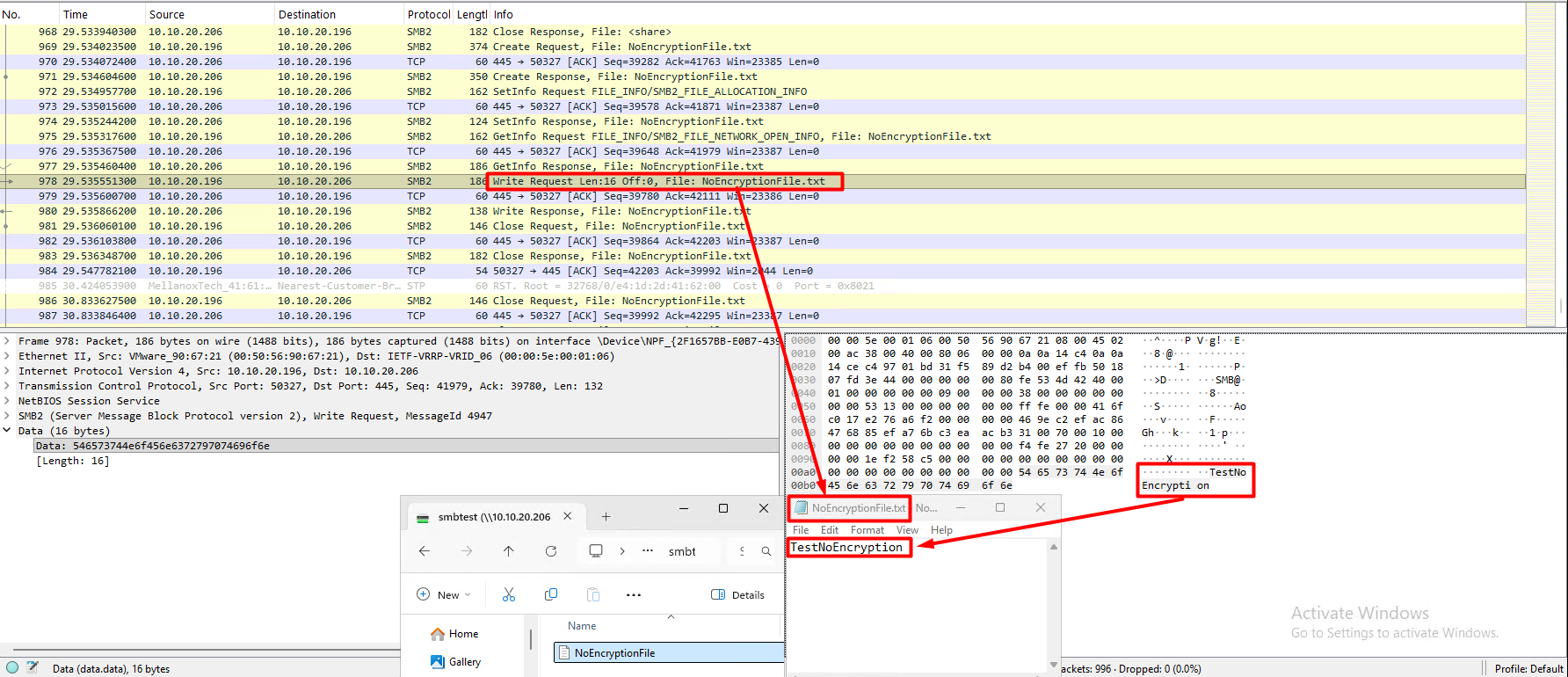
Encryption is disabled
When the SMB share is accessed without encryption, Wireshark packet captures can inspect the SMB traffic and reveal the contents of files being transferred or modified, provided the relevant data is captured.
This demonstrates that SMB data is transmitted in an unencrypted format when SMB encryption is not enabled.
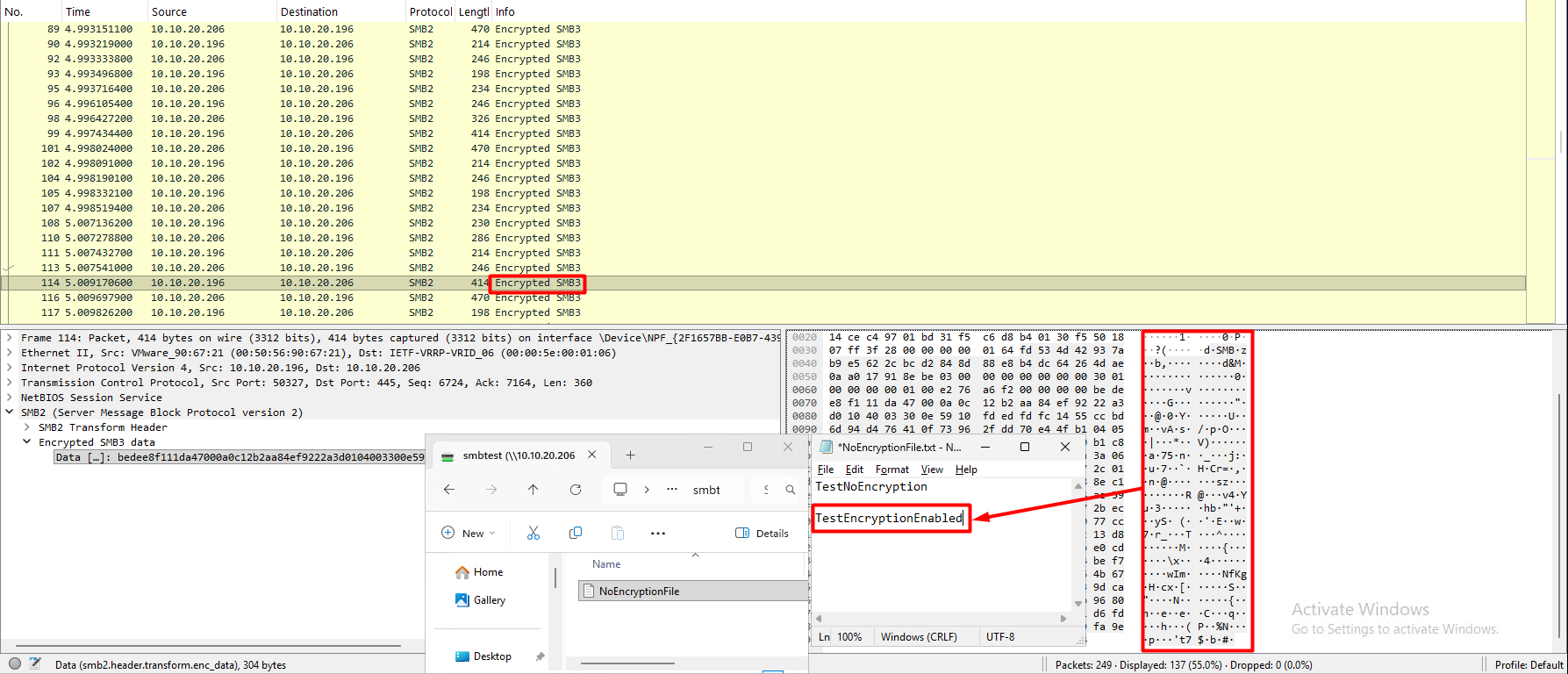
Encryption is enabled
When the SMB share is accessed with encryption enabled, packet captures in Wireshark cannot reveal the contents of files.
7. Summary
SMB encryption protects data transmitted between compatible Windows clients and NGX Storage over SMB connections.
Key points:
- SMB encryption requires SMB 3.0 or later.
- An NGX Storage SMB share has SMB encryption capability available by default after creation.
- Encrypted and unencrypted clients can access the same share.
- Encryption is negotiated and applied on a per-connection basis.
- Windows clients can require encryption using the -RequirePrivacy $true parameter with New-SmbMapping.
- The Get-SmbConnection cmdlet can be used to verify the negotiated SMB dialect and encryption status.
Performance should be evaluated under representative workloads when enabling encryption in high-throughput environments. It’s recommended to use SMB encryption only when it is mandatory.
COPYRIGHT
© 2025 NGX Teknoloji A.Ş. (NGX Storage). All rights reserved. Printed in the Turkey. Specifications subject to change without notice. No part of this document covered by copyright may be reproduced in any form or by any means-graphic, electronic, or mechanical, including photocopying, recording, taping, or storage in an electronic retrieval system-without prior written permission of NGX Storage. Software derived from copyrighted NGX Storage material is subject to the following license and disclaimer:
THIS SOFTWARE IS PROVIDED BY NGX Storage “AS IS” AND WITHOUT ANY EXPRESS OR IMPLIED WARRANTIES, INCLUDING, BUT NOT LIMITED TO, THE IMPLIED WARRANTIES OF MERCHANTABILITY AND FITNESS FOR A PARTICULAR PURPOSE, WHICH ARE HEREBY DISCLAIMED. IN NO EVENT SHALL NGX Storage BE LIABLE FOR ANY DIRECT, INDIRECT, INCIDENTAL, SPECIAL, EXEMPLARY, OR CONSEQUENTIAL DAMAGES (INCLUDING, BUT NOT LIMITED TO, PROCUREMENT OF SUBSTITUTE GOODS OR SERVICES; LOSS OF USE, DATA, OR PROFITS; OR BUSINESS INTERRUPTION) HOWEVER CAUSED AND ON ANY THEORY OF LIABILITY, WHETHER IN CONTRACT, STRICT LIABILITY, OR TORT (INCLUDING NEGLIGENCE OR OTHERWISE) ARISING IN ANY WAY OUT OF THE USE OF THIS SOFTWARE, EVEN IF ADVISED OF THE POSSIBILITY OF SUCH DAMAGE.
NGX Storage reserves the right to change any products described herein at any time, and without notice. NGX Storage assumes no responsibility or liability arising from the use of products described herein, except as expressly agreed to in writing by NGX Storage. The use or purchase of this product does not convey a license under any patent rights, trademark rights, or any other intellectual property rights of NGX Storage.
TRADEMARK
NGX Storage and the NGX Storage logo are trademarks of NGX TEKNOLOJI A.Ş. Other company and product names may be trademarks of their respective owners.